Restaurant POS workflow

Restaurant POS software: the point of sale system that moves every order from table to billing

Hulm restaurant point of sale software brings menu items, order entry, table workflows, kitchen tickets and payment records into one operating flow for your restaurant team.

Restaurant POS system by Hulm

Connected workflow

Sales, stock and daily activity in one operating view.

What the restaurant POS looks like in Hulm

Real screens from Hulm POS. Your setup is configured around your products, branches and team.

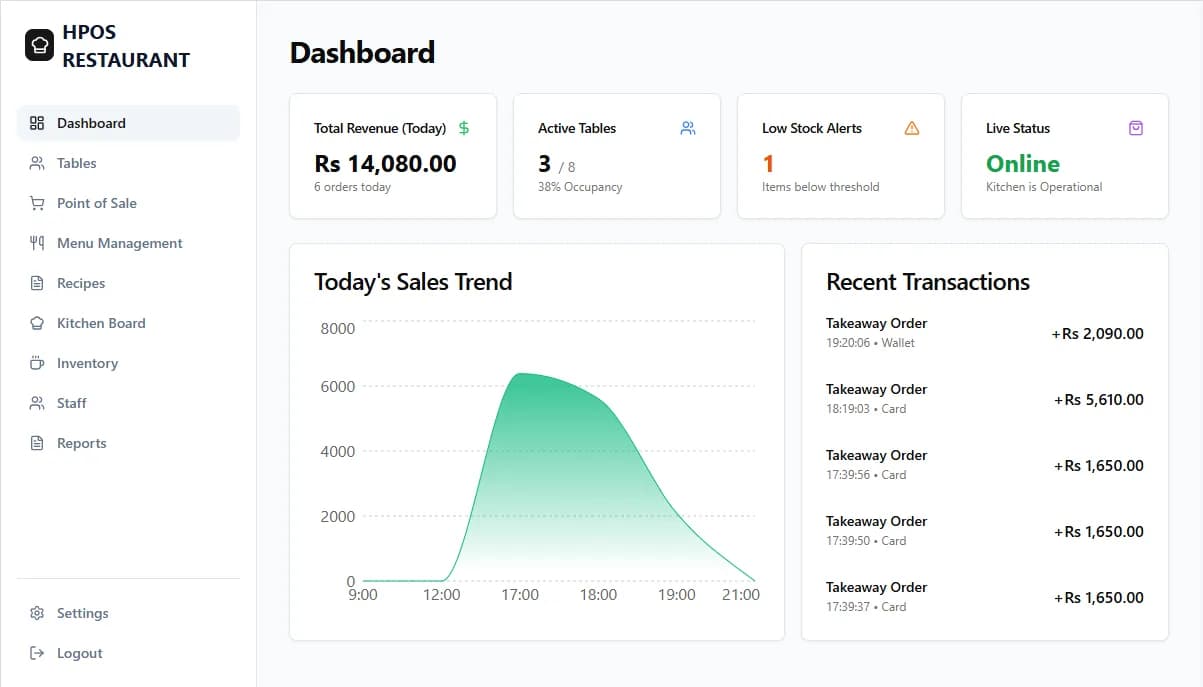
Hulm restaurant POS dashboard with revenue, active tables, low-stock alerts and sales trend (Restaurant POS)
Dashboard: today's revenue, active tables, low-stock alerts and sales trend.
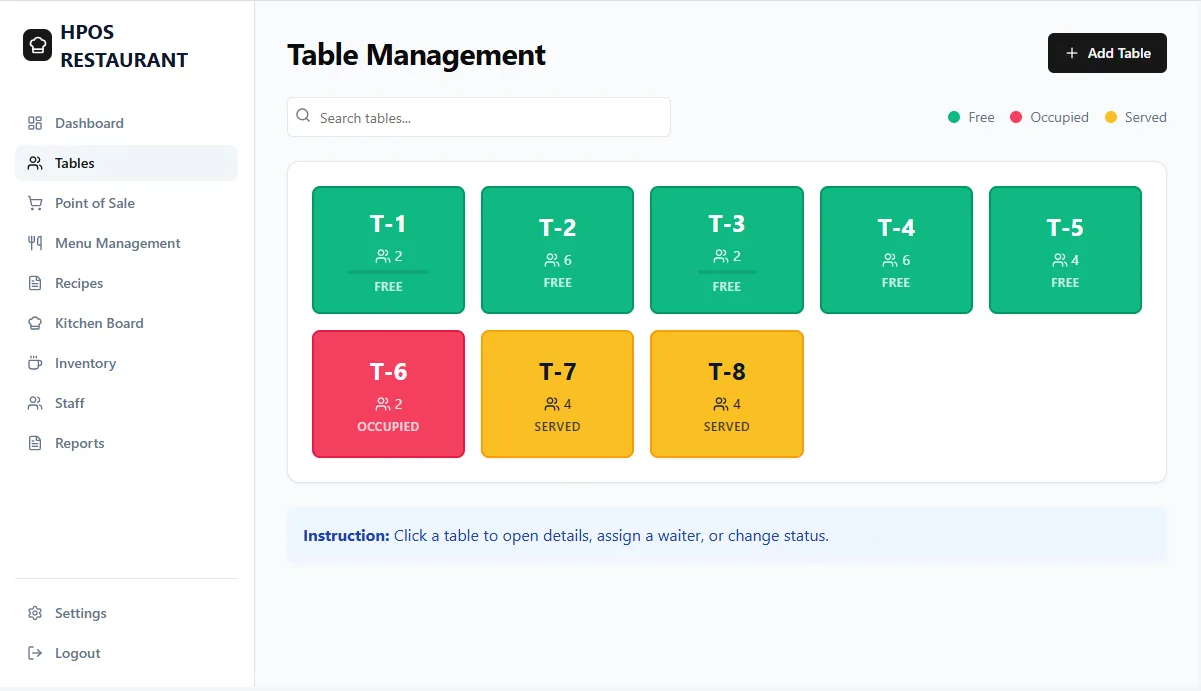
Hulm restaurant POS table management screen showing free, occupied and served tables (Restaurant POS)
Tables: see which tables are free, occupied or served.
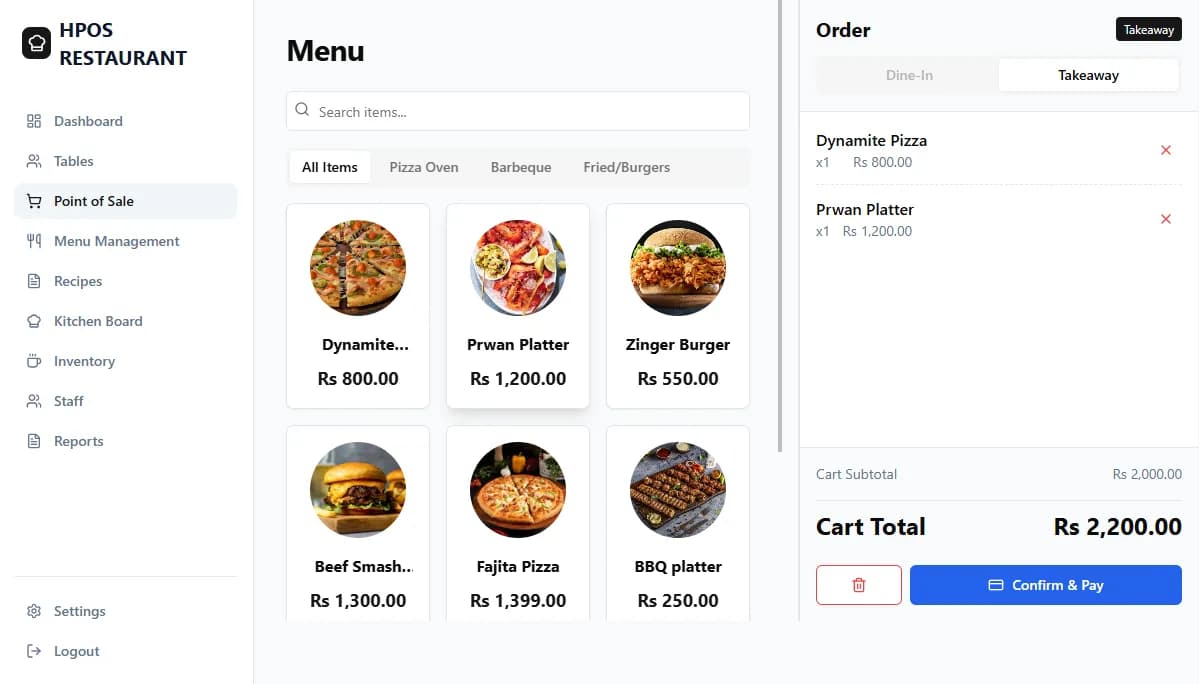
Hulm restaurant POS menu and order screen with takeaway cart (Restaurant POS)
Orders: build dine-in or takeaway orders from the menu.
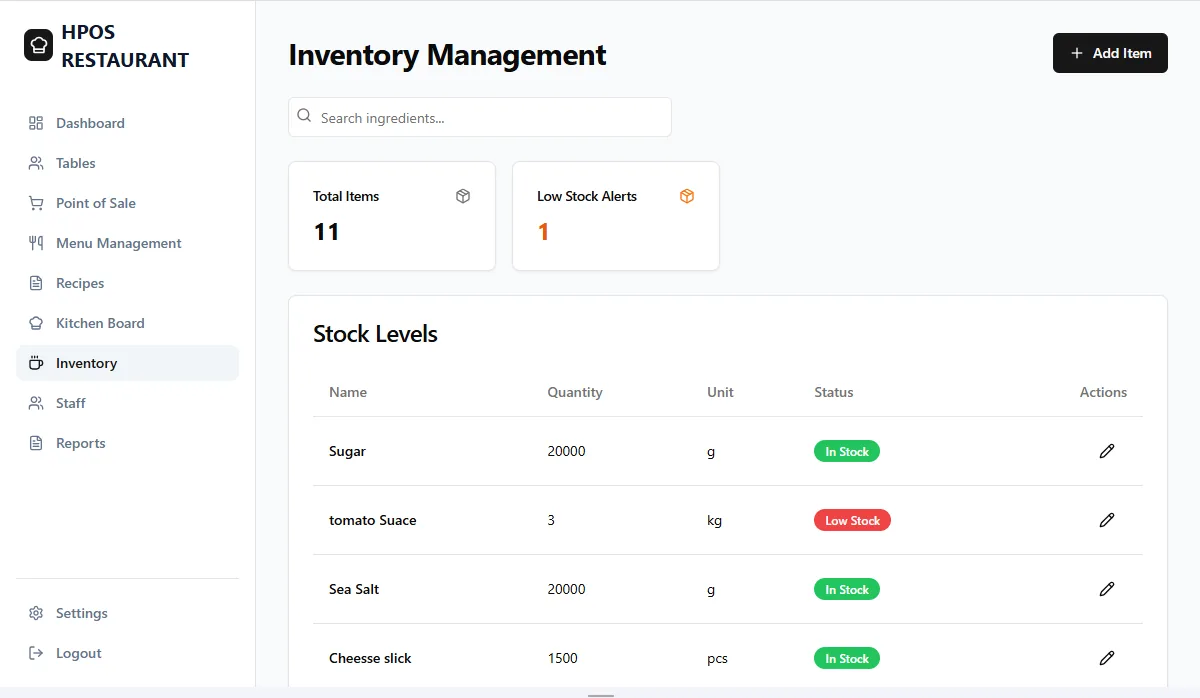
Hulm restaurant inventory screen with ingredient stock levels and low-stock status (Restaurant POS)
Ingredients: stock levels with low-stock status.
Workflow overview

Keep front-of-house and fulfilment on the same order

Give staff a shared path from order capture to preparation and payment, with a clearer record of what was sold during each shift.

Menu and modifier setup
Counter and table order workflows
Kitchen ticket routing options
Shift and sales reporting
Operational friction

Where restaurant orders lose momentum

Order changes are passed verbally and can be missed between the floor and kitchen.

Keep changes attached to the order

Record items and configured modifiers before sending the order into the fulfilment workflow.
Staff switch between separate tools for tables, bills and end-of-shift totals.

Use one restaurant flow

Connect table or counter orders with billing and daily sales records.

Managers cannot easily compare what sold during a shift.

Review item and sales activity

Use shared reports to examine sales activity, popular items and operational patterns.

Capabilities

Restaurant POS features for dine-in, takeaway and delivery

The final configuration depends on your plan, processes, devices and rollout scope.

01

Menu management

Organise menu items, prices and available modifiers for order entry.

02

Table and counter orders

Support the service model used by dine-in, takeaway or quick-service teams.

03

Kitchen tickets

Route configured order details to the preparation workflow.

04

Bill handling

Record payments and support the bill flows agreed during setup.

05

Ingredient visibility

Connect selected menu sales to inventory workflows where configured.

06

Shift reporting

Review sales activity by shift, user or configured location.

Common setups

Common restaurant setups

Start with the operating model closest to yours, then adjust the details during implementation.

Dine-in restaurant

Coordinate tables, orders, kitchen communication and billing.

Quick-service counter

Capture orders and move them quickly into fulfilment.

Multi-location operation

Review configured menu and sales activity across branches.

FBR integration support

FBR integration built into your restaurant POS

FBR integration is available for eligible Pakistan deployments. Hulm can confirm the appropriate configuration for your business and plan.

Review FBR integration

Transaction-linked invoices

Keep the configured invoice process connected to the completed restaurant sale.

Required invoice fields

Support the tax and receipt details agreed during implementation.

Daily activity records

Retain transaction information for review and reconciliation.

Who it can support

Restaurants and food businesses this POS supports

  • Dine-in restaurants
  • Quick-service restaurants
  • Takeaway counters
  • Small restaurant groups
Expected outcomes

What a connected restaurant workflow should improve

  • Clearer handoff from order to preparation
  • Fewer disconnected shift records
  • More consistent menu and billing workflows
  • Better visibility into sales activity

Customer story · Event Catering & Hospitality

How Farhan Caterers runs on Hulm POS

“During wedding season, we could have three events in one week and I was the only one who knew what was actually booked. Now the whole team can see it, and the tax side just takes care of itself.”Farhan Ahmed, Owner, Farhan Caterers
Read the Farhan Caterers POS case study

100%

Elimination of double-booking risks

Karachi, Pakistan

Setup questions

Restaurant POS system FAQs

These answers set expectations before plan selection and implementation.

What is the best restaurant POS system in Pakistan?

The best restaurant POS handles dine-in, takeaway and delivery orders, kitchen tickets, menu stock and FBR-compliant invoices. Hulm restaurant point of sale software does this in one cloud system with fast setup.

How much does a restaurant POS system cost in Pakistan?

Hulm restaurant point of sale starts at PKR 2,500 per month with a 14-day free trial. Plans with more users and branches are available as you grow.

Read: POS software price in Pakistan

Can I manage my own delivery riders with Hulm?

Yes. Delivery orders can be assigned and tracked, and the logistics app adds rider and vehicle management.

Read: logistics management

Does Hulm integrate with Foodpanda?

Not at the moment. Delivery orders can be entered at the POS so sales and stock stay in one place, and the logistics app helps you manage your own delivery riders.

Does the POS support PRA and SRB for restaurants?

Provincial requirements (PRA in Punjab, SRB in Sindh, KPRA in Khyber Pakhtunkhwa) are reviewed as part of your setup, alongside FBR where it applies. Share your registration details so the team can confirm the configuration.

Read: FBR integrated POS

Can Hulm support dine-in and takeaway orders?

Hulm can support counter and table-based workflows. The team will confirm how dine-in, takeaway and other order types should be configured for your operation.

Does it support kitchen tickets?

Kitchen ticket workflows are available. Confirm the required stations, printers and order-routing rules before rollout.

Can I use it across restaurant branches?

Multi-branch options are available. Plan choice depends on the number of locations, users and management controls required.

Plan the right rollout

Map your restaurant’s order flow before choosing the setup

Bring your service model, stations and branch requirements.

WhatsApp
Start free trial WhatsApp