
Best Point of Sale (POS) System for Small Business in Pakistan
Table of ContentsTap to expand
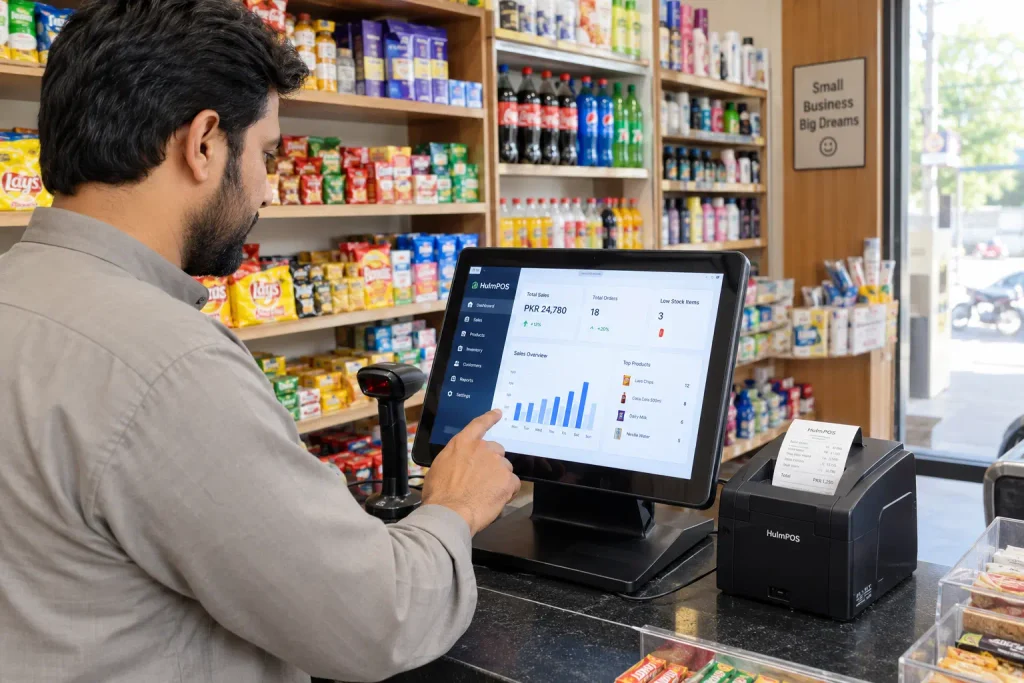
Running a small business means keeping track of sales, stock, customers, employees, and money every day. A POS system can bring those tasks together in one place. For a small shop or growing business, the right POS system for small business in Pakistan should do more than calculate a bill. It should help you sell faster, know what is in stock, understand your sales, and keep day-to-day operations organized.
For businesses in Pakistan, there are a few extra things to consider, such as pricing, FBR requirements, local support, internet availability, and whether the software can grow with the business. The best POS system in Pakistan also seamlessly integrates with payment methods and possesses robust reporting tools.
This guide explains what a point of sale system for small businesses actually does, which features matter, how much a POS can cost in Pakistan, and what to check before choosing one.
Ready to replace manual billing and spreadsheets?
Try HulmPOS free for 14 days and see how it fits your business.
Best POS Software in Pakistan: Quick Comparison
| Feature | Hulm POS | Shopify POS | Toast | Clover | Square |
|---|---|---|---|---|---|
| FBR-integrated invoicing | ✅ Built-in | ❌ | ❌ | ❌ | ❌ |
| Pricing in PKR | ✅ | ❌ | ❌ | ❌ | ❌ |
| Local Pakistani support | ✅ WhatsApp + phone | ❌ | ❌ | ❌ | ❌ |
| Free demo | ✅ | Limited | ❌ | ❌ | Limited |
| Best for | Retail, restaurants, pharmacy, cattle/livestock, mobile vendors | Online + retail stores | Restaurants only | General retail/hospitality | Retail, mobile |
| Multi-location support | ✅ | ✅ | ✅ | ✅ | Limited |
| Setup time | Same-day | 1–2 days | 3–5 days | 3–5 days | 1–2 days |
What Is a POS System for Small Business?
A POS system for small businesses is software that helps you process sales and manage the information connected to those sales.
A traditional cash register mainly handles transactions. Modern POS software can connect your sales with inventory, customers, employees, and reports.
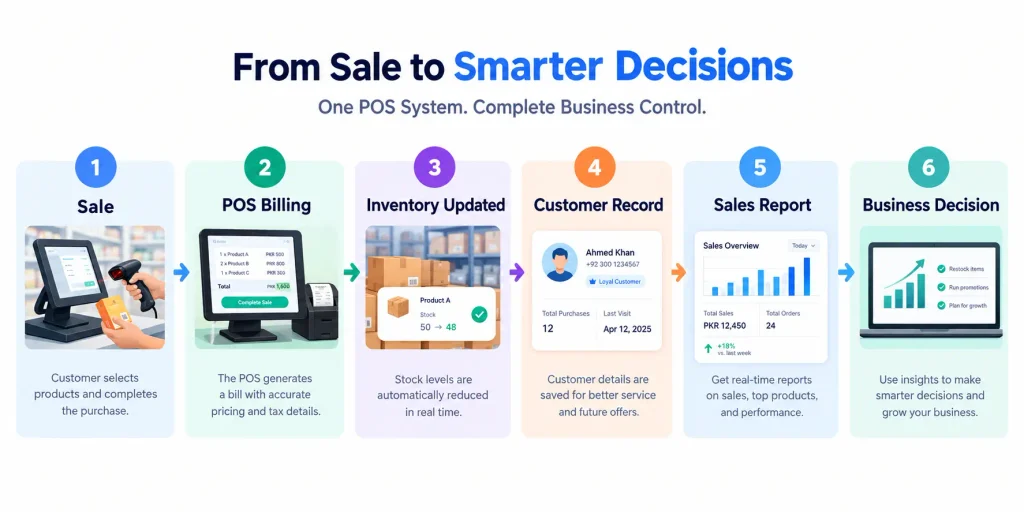
For example, when you sell a product, a POS system can record the transaction and update the stock at the same time. Instead of checking several notebooks or spreadsheets at the end of the day, you can see the information inside one system.
A small business POS may help you:
- Process sales and invoices
- Track inventory
- Record customer information
- Monitor sales
- Generate reports
- Manage employees and users
- Track purchases and vendors
- Manage branches as your business grows
The goal is simple: spend less time managing paperwork and more time running your business.
Quick answer: A good POS system for a small business should combine billing, inventory, customer management and reporting in one easy-to-use platform. Pakistani businesses should also evaluate local compliance, pricing, support and scalability.
Why a POS System is Important for Business in Pakistan
Many small businesses start with a cash register, calculator, notebook, or Excel sheet. That is perfectly understandable. The problem usually appears when the business starts getting busier.
More products mean more stock to track, more customers mean more transactions, and more employees mean more opportunities for mistakes. And once a business has more than one location, manually keeping everything synchronized becomes even harder.
A POS system can help with several common problems.
1. Faster Billing
Instead of calculating every item manually, employees can search or scan products and complete the transaction through the POS. That can make checkout faster and reduce avoidable calculation errors.
2. Better Inventory Control
One of the biggest advantages of connecting billing with inventory is visibility. When a product is sold, the system can update stock so the business owner has a clearer picture of what is available.
This is especially useful for:
- Furniture Store
- Toys Store
- Jewellery Shop
- Clothing Store
- Pharmacies
- Bakeries
- Retail Store
- Electric Store
3. Easier Sales Tracking
You should not have to wait until the end of the week to figure out how your business performed. A POS system can organize sales information into reports that help you understand what is happening.
You can use those reports to identify:
- Best-selling products
- Slow-moving products
- Daily sales
- Sales trends
- Employee performance
- Branch performance
4. Less Dependence on Spreadsheets
Spreadsheets can be useful, but they become harder to manage as transactions and products increase. A dedicated POS connects everyday transactions with your operational data, reducing the amount of information you have to maintain manually.
5. Better Customer Records
A small business can also use POS software to maintain customer information and purchasing history. That becomes useful when you want to build loyalty, understand repeat purchases, or provide better customer service.
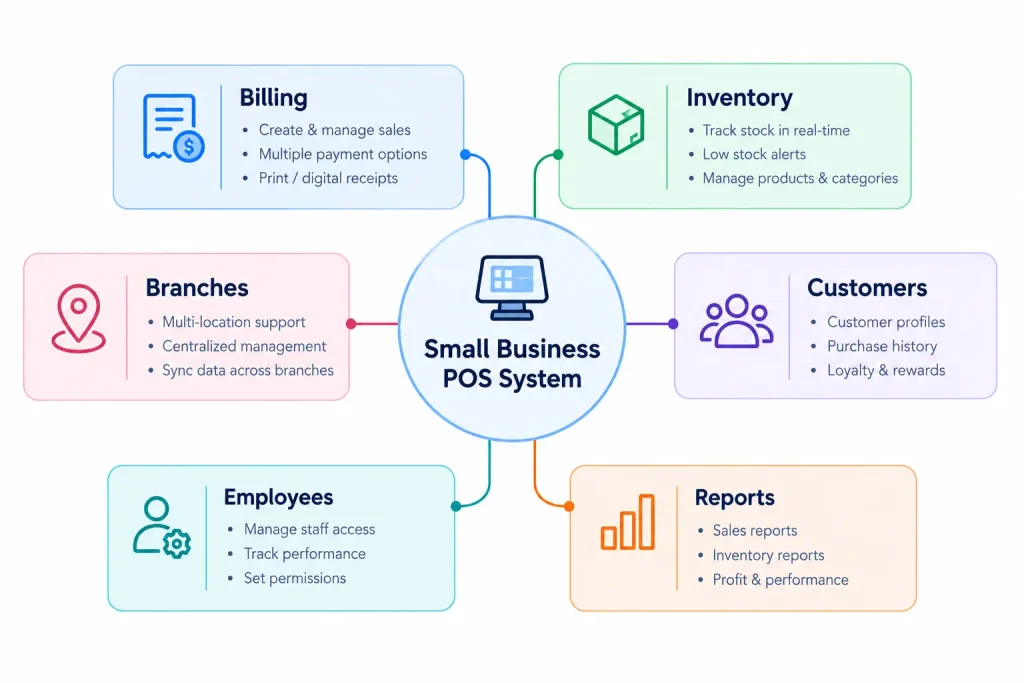
What Should a Small Business POS System Include?
You do not need every feature available in the market. You need the right features for your business. Here are the ones worth looking at before you buy.
1. Simple POS Billing
Billing should be quick enough for staff to learn without lengthy training.
Look for:
- Product search
- Barcode scanning
- Discounts
- Quantity controls
- Invoice generation
- Multiple payment options
- Easy checkout
The simpler the checkout process, the easier it is for employees to use consistently.
2. Inventory Management
If you sell physical products, inventory management should be near the top of your list. A useful POS and inventory system should help you answer questions such as:
How many units are left?
Which products are selling quickly?
Which products need to be reordered?
What did we sell today?
You should not need to count everything manually every night just to understand your stock position.
3. Sales Reports
Reports turn transactions into useful business information. A small business owner should be able to review sales without spending hours building spreadsheets.
Useful reports may include:
- Daily sales
- Weekly sales
- Monthly sales
- Product performance
- Sales by employee
- Sales by branch
- Revenue trends
4. Customer Management
A POS system can also act as a basic customer database. Depending on the software, you may be able to store:
- Customer names
- Contact information
- Purchase history
- Loyalty information
- Customer activity
This gives you more than a receipt. It gives you information that can help build repeat business.
5. FBR Integration
FBR requirements are an important consideration for eligible businesses in Pakistan. Before choosing a POS, check exactly how its FBR integration works and whether it meets the requirements applicable to your business.
Hulm currently lists native FBR integration as part of its Starter POS plan. That makes FBR functionality one of the questions you should ask any POS provider before signing up.
6. Employee Management
If several employees use your POS, you need control over who can access what. Employee and user management can help a business owner maintain better operational control and understand transactions by staff member. This becomes increasingly important as the business grows.
7. Multi-Branch Support
You may have one shop today and two or three locations later. That is why scalability matters. The POS you choose should ideally give you a clear upgrade path when you need additional users, branches or more advanced reporting.
Hulm’s current pricing structure includes 1 user/1 branch in Starter, 5 users/2 branches in Growth and 10 users/5 branches in Business, with additional operational features at higher levels.
8. Cloud Access
Cloud-based POS software can make it easier to access business information without being physically tied to a single computer. For owners who want visibility into sales and operations while away from the shop, this can be particularly useful. Hulm describes its POS platform as cloud-based and its site also offers a mobile POS module for Android smartphones and tablets.
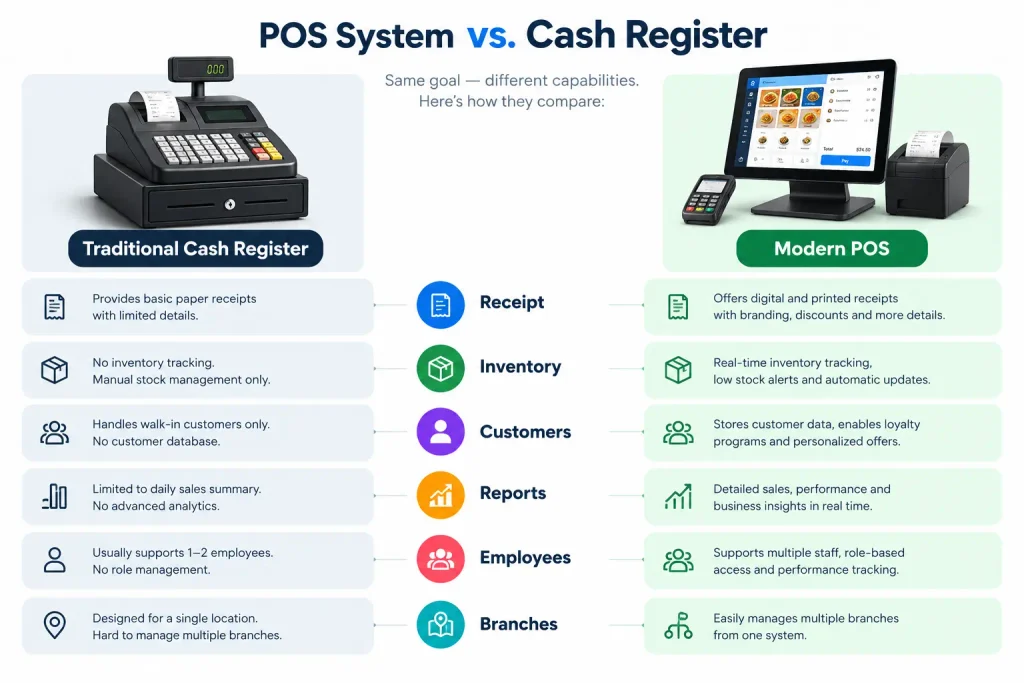
POS System vs. Cash Register
A cash register records a sale. A modern POS system can help manage the business around that sale.
| Cash Register | POS System |
|---|---|
| Records transactions | Records and organizes transactions |
| Basic receipts | Detailed invoices/receipts |
| Limited reporting | Sales and business reports |
| Manual inventory | Connected inventory management |
| Little customer information | Customer records |
| Limited employee controls | User/employee management |
| Difficult to scale | Built to support business growth |
For a very small business with only a few transactions, a cash register may be enough. But as sales, products and staff increase, the additional visibility offered by POS software becomes more valuable.
Best Point of Sale Software in Pakistan
If you’re comparing the best point of sale systems for small businesses in Pakistan, here’s how the major options stack up:
1. Hulm — Best Overall for Pakistani Businesses
Hulm is built specifically for the Pakistani market, with FBR-integrated invoicing, PKR-based pricing, and dedicated local support. It’s the strongest fit for retail stores, restaurants, pharmacies, and mobile vendors who need compliance handled automatically rather than bolted on. See Hulm POS Features →
2. Shopify POS — Best for Online + Offline Retail
Shopify POS works well if you already run a Shopify store and want in-store and online inventory synced. It doesn’t offer FBR integration or local pricing, so Pakistani retailers typically pair it with a separate compliance workaround.
3. Toast — Restaurant-Only, US-Focused
Toast is built for the US restaurant market. It lacks Pakistan-specific tax compliance and local payment method support, making it a harder fit outside North America.
4. Clover — Flexible but Not Localized
Clover offers solid hardware flexibility for general retail and hospitality, but like Toast and Shopify, it has no FBR integration and prices in USD.
5. Square — Simple, but Limited for Pakistan
Square is easy to set up for very small operations, but Pakistani businesses run into the same compliance and currency gaps as with the other international options.
The pattern:
Every international POS on this list requires a Pakistani business to solve tax compliance and local pricing separately. Hulm is the only option here built to handle that from day one. Compare plans and pricing →
Best Free POS Systems for Small Businesses in Pakistan
Budget constraints often prevent small businesses from investing in expensive software. Fortunately, there are free POS systems in Pakistan that deliver excellent performance:
Hulm Point of Sale
- Hulm POS gives you a 15-day free trial, after that, pay only PKR 2,500 per month for full inventory, sales, customer, purchase, order, vendor, and loyalty management.
Square Point of Sale
- Provides basic POS features ideal for small-scale operations.
Imonggo
- A free POS system that supports basic retail needs with features like inventory management and sales tracking.
POS and Inventory System for Businesses
If you’re searching for the best POS software in Pakistan that combines sales tracking and inventory management, here are some great options:
- Hulm Point of Sale: Known for its detailed inventory tracking, real-time updates, and multi-location support.
- Shopify Point of Sale: Syncs online and in-store inventory seamlessly.
- Vend Point of Sale: Offers real-time inventory updates and analytics.
These systems are perfect for businesses that deal with large inventories or multiple outlets.
Simple Point of Sale software in Pakistan for Business
Small business owners usually consider very simple point-of-sale systems that require few installations and training. Hulm POS and Shopify POS have come out on top in this category, offering easy interfaces and uncomplicated features. These systems are well-suited for retail shops, cafes, and service-based businesses.
Mobile POS Systems for Businesses
Mobile POS systems (mPOS) are gaining popularity in Pakistan. These systems operate via smartphones or tablets, making them highly portable and cost-effective.
- Hulm POS: Perfect for small vendors and pop-up shops.
- PayPal Zettle: Ideal for businesses already using PayPal for transactions.
Cloud-Based POS Systems
Cloud-based POS systems offer flexibility and remote access, making them ideal for growing businesses in Pakistan. Popular choices include:
- Hulm: Known for its advanced, cloud-based, user-friendly reporting and multi-location management.
- Clover: Offers secure, cloud-based functionality with robust features.
A Simple POS Buying Checklist
Save this checklist before you choose your software.
Billing
☐ Fast checkout
☐ Product search
☐ Barcode support
☐ Discounts
☐ Invoices/receipts
Inventory
☐ Real-time stock information
☐ Product management
☐ Stock reports
☐ Purchase management
Customers
☐ Customer profiles
☐ Purchase history
☐ Loyalty/customer features
Management
☐ Sales reports
☐ Employee controls
☐ Branch management
☐ Business dashboards
Pakistan
☐ PKR pricing
☐ Relevant FBR functionality
☐ Local customer support
☐ Suitable payment options
Growth
☐ More users can be added
☐ More branches can be added
☐ Additional features available
☐ Data remains centralized
Before buying
☐ Free trial or demo
☐ Transparent pricing
☐ Easy setup
☐ Suitable for your business type
How to Choose the Right POS System for Your Small Business
Choosing POS software becomes much easier when you start with your own business instead of starting with a list of software brands.
Step 1: Write Down Your Daily Problems
Ask:
- How do I currently create bills?
- How do I track stock?
- How do I calculate daily sales?
- How do I manage customers?
- How do I track employees?
- How do I handle purchases?
- What happens when I am not at the shop?
These answers tell you which POS features you actually need.
Step 2: Decide What You Need Today
Do not pay for ten features when you only need five.
A small shop may initially need:
Billing + inventory + customers + reports
A growing business may need:
Billing + inventory + CRM + purchasing + employees + branches
Choose based on your current workflow while making sure the software has room to grow.
Step 3: Check the Total Cost
Ask the provider:
- What is the monthly fee?
- Are there additional user charges?
- Are there branch charges?
- Is hardware required?
- Are setup fees included?
- Is support included?
- Are integrations extra?
This prevents unpleasant surprises later.
Step 4: Test the Software Yourself
This is one of the most important steps. Do not choose POS software based only on screenshots.
- Create a test sale.
- Add a product.
- Change its price.
- Apply a discount.
- Process a return.
- Check inventory.
- Open a sales report.
Try it as an employee would use it. A free trial can tell you more in one day than a dozen feature pages.
Why HulmPOS Is Worth Considering for a Small Business
The best POS system is not automatically the one with the longest feature list. It is the one that makes your business easier to run.
HulmPOS is positioned as an all-in-one platform for sales, inventory, customers and business operations. Its current Starter plan is designed for small shops and startups and starts at PKR 2,500/month. The plan includes one user and one branch, POS billing, inventory management, customer records, sales reports and native FBR integration.
As the business grows, Hulm’s higher plans add additional users, branches, CRM, vendor and purchase management, order management and advanced reporting. Hulm also offers a 14-day free trial, so a business can test the software before committing to a subscription.
What does that mean for a small business?
You can start with the basics. Then add more capabilities as your business becomes more complex. That is often a better approach than buying an expensive, complicated system from day one.
Start with HulmPOS
14-day free trial. No long-term commitment.
How a POS System Can Change a Small Business Workflow
Before POS:
Customer → Manual calculation → Paper receipt → Manual stock update → End-of-day spreadsheet → Manual report
After POS:
Customer → POS billing → Automatic transaction record → Inventory update → Sales report → Business decision
The point is not simply to make the checkout screen look modern. The point is to eliminate unnecessary manual work.
POS ROI: Where the Value Really Comes From
A POS system does not create profit by itself. The value comes from better processes. Consider a simple example:
| Business problem | Without POS | With POS |
|---|---|---|
| Billing | Manual | Centralized |
| Stock tracking | Manual checking | System-based tracking |
| Sales reports | Spreadsheet work | Ready reports |
| Customer history | Paper/Excel | Customer records |
| Owner visibility | Limited | Dashboard/reporting |
| Business expansion | More manual work | Scalable system |
The exact financial benefit depends on the business, so do not judge a POS only by its subscription price. Judge it by the time, errors and operational problems it can help eliminate.
Manual workflow vs POS workflow
| Task | Manual process | POS process |
|---|---|---|
| Create bill | Multiple steps | Centralized |
| Update stock | Manual | Connected to sale |
| Check daily sales | Manual calculation | Report |
| Check customer history | Search records | Customer profile |
| Review business performance | Spreadsheet | Dashboard/report |
Check how retail businesses use POS to improve operations
Conclusion
If you’re serious about growing your business, stop wasting time comparing dozens of tools. After reviewing the market, one name stands out above the rest — HulmPOS.
Built specifically for Pakistani businesses, HulmPOS isn’t just another imported system with extra fees and missing local features. It’s a complete, cloud-based point of sale and inventory solution trusted by smart business owners who want more control, better reporting, and happier customers.
The best part? You don’t have to take our word for it, try HulmPOS free for 15 days, no credit card required. After that, it’s only PKR 2,500 per month, a small investment for the kind of clarity and control that transforms operations. Hundreds of smart business owners are already making the switch. Don’t get left behind.
Frequently Asked Questions
Ans. The right POS depends on your business type, budget, required features, and growth plans. Small businesses should compare billing, inventory, reporting, customer management, local compliance, support and scalability before choosing software.
Ans. POS pricing varies by provider and plan. Hulm’s current Starter plan starts at PKR 2,500 per month and is designed for small shops and startups. It includes one user, one branch, POS billing, inventory, customer records, sales reports and native FBR integration.
Ans. At minimum, look for easy billing, inventory management, sales reporting, customer records, user controls and a pricing plan that fits your business. Businesses in Pakistan should also evaluate relevant FBR requirements.
Ans.Yes. Many modern POS platforms connect sales transactions with inventory, making it easier to keep stock information updated.
Ans. Yes. A small shop can use POS software to simplify billing, monitor inventory, track sales and organize customer information without relying entirely on manual records. Talk to our team →
Ans. That depends on the business and the FBR requirements applicable to it. Before choosing software, confirm your compliance obligations and ask the provider how its FBR integration works. Learn more about FBR integration →
Ans. Some POS systems support mobile devices. Hulm’s Mobile POS module is designed to run on Android smartphones and tablets.
Ans. Yes, depending on the software and plan. Hulm’s current plans include multi-branch support as businesses move beyond the Starter plan.
Ans. Cloud POS can be useful for businesses that want centralized information and remote access. However, check your internet connection, device requirements, support options and what happens when connectivity is limited before selecting a system.
Ans. Yes. A trial or demo is one of the best ways to determine whether your staff can use the system comfortably and whether it fits your daily workflow.
Key Takeaways
- A POS system combines sales and business operations in one platform.
- Small businesses should prioritize billing, inventory, customers and reporting.
- Pakistani businesses should evaluate applicable FBR requirements.
- Pricing should be evaluated against features and future growth.
- Testing the software before buying is recommended.
- HulmPOS currently offers a 14-day trial and a Starter plan from PKR 2,500/month.
Upgrade Your Business with Hulm POS
Designed for speed, simplicity, and multi-location scalability. Start ringing up sales in minutes.
Start Your Free Trial
 WhatsApp