
Best Mobile POS System for Modern Business
Use a mobile device for supported retail, restaurant and service workflows. Payment options, live reporting and inventory access depend on your configuration.
- Instant cloud activation
- Local phone & WhatsApp support
- Zero credit card required
Mobile POS
Hulm POS • Connected Capability
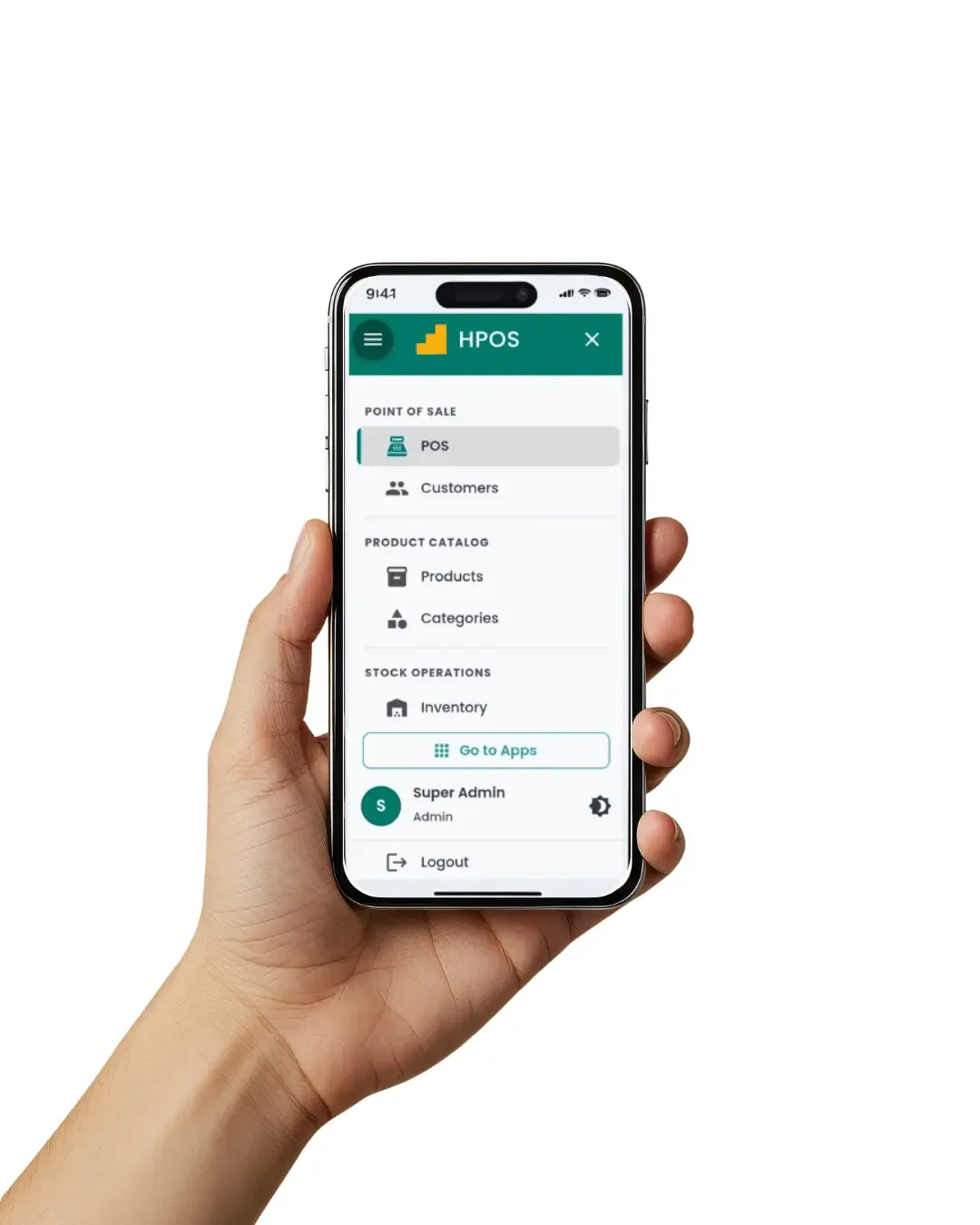
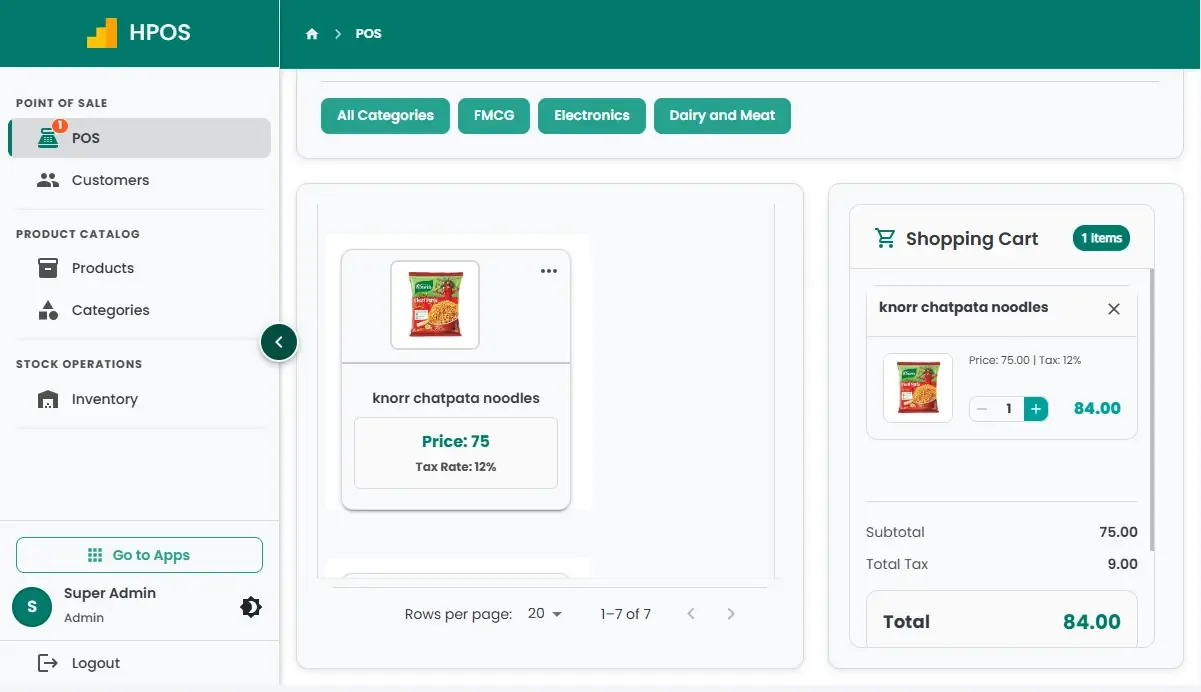
See Hulm Mobile POS in action
Real screens from the Hulm workspace, where mobile pos runs alongside POS, inventory and reporting.
What is a Mobile POS System?
A mobile POS system (mPOS) turns smartphones or tablets into powerful payment terminals, replacing traditional fixed registers with flexible, cloud-based technology. With mobile POS software, businesses can accept payments, manage sales, and track inventory anywhere using a secure POS mobile solution without investing in costly bulky hardware.
- Runs in the web browser on smartphones, tablets and handheld POS terminals, with no app to download.
- Works on Wi-Fi or mobile data; keep a backup connection such as a mobile hotspot for busy hours.
- Print receipts via portable Bluetooth printers or send digital SMS/WhatsApp invoices.
Connected to Your Hulm POS Workspace
Unlike disconnected tools that require complex APIs, this module works natively with your point of sale, inventory counts, and financial ledgers without delays.
Mobile POS System Features for Phones and Tablets
Configure the mobile experience around your products, users, devices and accepted payment methods.
01 Sign Up & Sign In
Create your account and sign in to the Hulm dashboard to start setting up your business in minutes.
02 Connect Payments & Printers
Link your bank account, mobile wallets, or connect portable Bluetooth receipt printers with a single tap.
03 Product Catalogue
Add products by importing inventory, scanning barcodes with your phone's camera, or manually entering items.
04 Process Sales in Seconds
Use the on-the-go checkout to process sales, record supported payment methods and provide digital receipts where configured.
Live Cloud Sync
Every sale is saved to your Hulm cloud workspace as it happens, so stock and reports stay up to date across devices.
Multi-Counter Floor Mobility
Bust long checkout queues by having staff take orders and payments directly on the sales floor or table.
Why Pakistani Businesses Sell on Phones and Tablets with Hulm
Eliminate high hardware costs and gain the freedom to sell at exhibitions, pop-ups, and curbside delivery:
Mobile POS vs Traditional Fixed Registers
Hardware Cost
Dedicated POS terminals are expensive. Hulm runs on compatible phones and tablets you may already own, so you can set up a tablet POS with little or no new hardware.
Mobility & Portability
Traditional registers are tethered to one counter. Hulm mPOS allows you to sell anywhere on the floor, curbside, or at outdoor pop-ups.
Setup & Training Time
Complex legacy software takes days to learn. Hulm's mobile screens are designed so cashiers pick up the sales flow quickly.
Backup Connectivity
Because Hulm runs in the cloud, a phone hotspot is an easy backup when broadband drops, so the counter keeps selling.
Real-World Mobile POS System Use Cases
Trusted across Pakistan for versatile operational setups:
- Pop-Up Shops & Exhibitions - Sell at trade fairs, expos, and seasonal markets without electrical wiring.
- Food trucks and cafes - Support orders at tables, drive-throughs or outdoor service points.
- Line Busting in Busy Retail - Speed up peak holiday queues by adding mobile checkout stations.
- Delivery & Field Agents - Collect cash or digital payments at the customer's doorstep upon delivery.
Mobile POS FAQs
Everything you need to know about setting up and running Hulm on phones and tablets.
What is a mobile point of sale system?
A mobile point of sale (mPOS) system is cloud-based software that transforms smartphones or tablets into payment terminals. It allows businesses to accept payments, track sales, and manage inventory without bulky hardware.
How does a mobile POS system work?
Sign in to Hulm on a compatible phone or tablet, connect a Bluetooth or USB receipt printer if you need receipts, add your products and start selling. Sales sync with your Hulm cloud workspace.
What is the best mobile POS system for small business?
Hulm is built for small businesses in Pakistan: plans start at PKR 2,500 per month, it runs on compatible devices you may already own, setup guidance is included, and FBR integration is available.
Are mobile POS systems secure?
Hulm runs over encrypted HTTPS connections, with user roles and permissions controlling what each staff member can see and do. Card payments are processed by your payment provider. Ask the team for current security details for your deployment.
Is there a Hulm mobile app on the App Store or Google Play?
Not at the moment. Hulm runs in the web browser on phones, tablets and computers, so there is nothing to download: sign in and start selling.
Do I need internet to use mobile POS?
Yes. Hulm is a cloud POS and needs an internet connection (Wi-Fi or mobile data) to record sales. It does not have an offline mode, so we recommend a backup connection such as a mobile hotspot.
What payment methods can I accept?
Record cash, card, mobile-wallet (such as JazzCash and EasyPaisa) and bank-transfer payments. Integrated payment gateways are not available yet and are planned for a future update.
Is there a free trial?
Yes! Get 14 days free with full access to all features. No credit card required to start.
More apps in the same Hulm POS login
Pakistani businesses run on Hulm. Here is what they say
Real reviews from business owners who use Hulm POS, published on Google.

Jawad hussain
“Hulm Solutions POS is an excellent choice for retail shops in Pakistan. It's user-friendly, reliable, and perfectly suited for managing inventory and sales. Highly recommended for retail business owners!”

Zohaib khalid
“We've been using this POS for a few months and it's been a game changer for our retail store. It's simple, fast, and makes managing sales and inventory much easier. Support is responsive and helpful. Highly recommended for businesses in Pakistan looking for a solid POS solution.”

Muhammad Rizwan
“After a successful free trial, I now run my entire business on HulmPOS because it is simple, affordable, and incredibly easy to use.”

Mustafa Sheikh
“HulmPOS provides the easy way to operate my inventory management. Highly recommended!”

Eesha Khan
“Hulm POS has completely transformed how I run my restaurant. The FBR integration makes tax reporting so much easier, and managing orders and inventory is a breeze. Plus, it's affordable! Honestly, it's the best POS software in Pakistan for restaurants.”

aqsa khalid
“Hulm POS has made running my bakery so much smoother. With FBR integration, tracking orders and inventory is effortless, and it keeps everything affordable. It's definitely the best POS software in Pakistan for bakeries.”

Mustafa Hasnain
“As a mart owner, I needed a POS with FBR integration and tried HULM POS's free demo. It's user-friendly, automates FBR invoices, and manages inventory seamlessly. The real-time reporting and affordable pricing make it a great choice for small businesses.”

STARK
“As someone who isn't very tech-savvy, I appreciate how easy HulmPOS is to use. Setting up was a breeze, and managing my small business has never been simpler. Wish I had found this sooner.”

ZAIN UL ABIDIN
“HulmPOS significantly increased my bakery sales & fulfilled all needs to manage my bakery operations”
Transform Your Business with Hulm POS
Join retail stores, restaurants, pharmacies and manufacturers that run sales, stock and reporting on Hulm.
Create your free account
Takes less than 2 minutes. No credit card required.

 WhatsApp