
Excel vs POS Software for Retail Shops: When Is It Time to Upgrade?
Table of ContentsTap to expand
Many retail businesses start with Microsoft Excel or Google Sheets to manage their daily operations. It is familiar, affordable and easy to use. You can create product lists, record sales, calculate totals and maintain basic inventory records without purchasing specialised software.
For a small shop with limited products and only one person managing sales, Excel might be enough.
But what happens when your business grows?
You start handling hundreds of products, multiple daily transactions, different employees, supplier purchases and customer records. Suddenly, you have separate spreadsheets for sales, inventory, purchases and expenses. Someone forgets to update stock, another employee changes the wrong formula, and the numbers in your spreadsheet no longer match the products on your shelves.
This is where managing a retail business through Excel becomes increasingly difficult.
A retail POS system (Point of Sale) connects billing, inventory, sales records and other business operations in one platform. Instead of manually updating spreadsheets after every transaction, a POS system can record sales and update connected inventory records as part of the checkout process.
But does every shop need POS software? Not necessarily.
In this guide, we compare Excel vs POS software for retail shops, explain the limitations of spreadsheet-based management, identify the signs that your business is ready to upgrade and show how to move your existing product data into a POS system.
Quick Answer: Should Retail Shops Use Excel or POS Software?
Excel is suitable for small retail businesses with limited products, low transaction volumes and simple record-keeping requirements.
POS software is generally a better choice when a shop needs connected billing and inventory, multiple employees handling sales, barcode scanning, customer records, purchase management, real-time stock visibility or business reporting.
You should consider upgrading when maintaining your spreadsheets takes more time than the business activities they are supposed to simplify.
For Pakistani retailers looking to replace manual billing and disconnected records, HulmPOS offers cloud-based POS billing, inventory management, sales history and business reporting.
You can explore HulmPOS with a 14-day free trial.
1. What Is Excel-Based Retail Management?
Excel-based retail management means using spreadsheets to organise and maintain business information such as:
- Product names and prices.
- Available stock quantities.
- Daily sales records.
- Purchase transactions.
- Supplier information.
- Customer details.
- Expenses and calculations.
- Monthly sales summaries.
For example, a clothing shop might maintain one spreadsheet containing jeans, shirts, trousers, dresses and accessories.
Whenever a product is sold, the shop owner or employee manually records the transaction and updates the remaining stock quantity.
A simple Excel inventory sheet might look like this:
| Product | Opening Stock | Sold | Remaining Stock |
|---|---|---|---|
| Men's Jeans | 50 | 12 | 38 |
| Women's Tops | 40 | 15 | 25 |
| Shirts | 60 | 18 | 42 |
| Trousers | 35 | 8 | 27 |
| Belts | 30 | 10 | 20 |
Excel formulas can calculate remaining stock automatically once the correct sales quantities are entered.
However, someone still needs to enter the sales information correctly and consistently.
If an employee forgets to record a transaction, the spreadsheet will not know that a product has been sold.
This is an important difference between maintaining records manually and using connected retail software.
Advantages of Using Excel for Retail Shops
Excel is not a bad business tool. It offers several advantages:
- Affordable: Many businesses already have access to spreadsheet software.
- Flexible: You can create customised columns, formulas and reports.
- Easy to learn: Basic spreadsheet operations are familiar to many shop owners.
- Useful for calculations: Formulas can calculate totals, costs and other values.
- Data analysis: Filters, PivotTables and charts help analyse structured information.
- Data export: Spreadsheet files can be shared and used with other applications.
Microsoft also explains that Excel is particularly useful for calculations, numerical analysis, PivotTables and charts.
The issue is not Excel itself. The issue is expecting a spreadsheet to handle every operational activity of a growing retail business.
2. What Is Retail POS Software?
Retail POS software is a digital business management system that processes customer transactions and connects sales with other retail operations.
Unlike a standalone spreadsheet, a POS system provides a structured workflow for handling checkout transactions, products, inventory and business records.
For example, imagine a customer purchases:
- 1 pair of jeans – Rs. 2,500
- 1 shirt – Rs. 1,800
- 1 belt – Rs. 700
The cashier searches for the products or scans their barcodes, adds them to the checkout screen and generates the invoice.
After completing the transaction, the POS records the sale and updates the connected inventory quantities.
The owner can then review the transaction through sales history and access available business reports.
What Can Retail POS Software Manage?
A retail POS system may include:
- Product and category management.
- Barcode-based billing.
- Sales transactions and receipts.
- Inventory tracking.
- Low-stock alerts.
- Customer records.
- Purchase and supplier management.
- Sales reports.
- Employee accounts and access controls.
- Multi-branch operations.
The main advantage is that different business activities can work through one connected platform instead of depending on multiple manually maintained files.
3. Excel vs POS Software: Key Differences
The biggest difference between Excel and POS software is how they handle everyday retail transactions.
Excel generally requires people to enter and organise information manually. A POS system connects the checkout process with relevant business records.
Here is a practical comparison.
| Feature | Excel / Google Sheets | Retail POS Software |
|---|---|---|
| Product management | Manual spreadsheet records | Structured product catalogue |
| Billing | Manual calculations or customised sheets | Dedicated checkout screen |
| Barcode scanning | Requires additional setup | Supported by compatible POS systems |
| Inventory updates | Must be entered or integrated | Can update through recorded sales |
| Sales history | Separate transaction records | Searchable sales history |
| Customer records | Manually maintained | Connected customer profiles |
| Purchase management | Separate sheets | Dedicated purchase workflows where supported |
| Low-stock monitoring | Formulas and manual checks | Supported stock alerts |
| Employee activity | Limited unless customised | User accounts and permissions where supported |
| Sales reports | Manual formulas and PivotTables | Built-in reporting |
| Multiple branches | Separate or shared workbooks | Centralised management where supported |
| FBR integration | Not a native spreadsheet function | Available through eligible POS integrations |
| Data analysis | Highly flexible | Built-in reports and export options |
Important: Excel can support collaboration, formulas, macros and integrations. A customised spreadsheet can handle more than basic record-keeping. However, building and maintaining a complete retail operating workflow in spreadsheets requires additional configuration and ongoing human effort.
Excel vs POS: A Practical Retail Example
Suppose you own a grocery shop in Lahore.
A customer purchases five products worth Rs. 2,000.
Using Excel:
- The cashier calculates the total.
- The employee receives payment.
- Someone records the sale.
- The product quantities are updated in the inventory sheet.
- The owner checks the spreadsheet later.
- Daily sales are calculated using formulas or manual summaries.
Using POS software:
- The cashier scans or searches for the products.
- The software calculates the bill.
- The employee records the payment.
- The POS records the transaction.
- Connected inventory quantities are updated.
- The transaction becomes available in sales history and reporting.
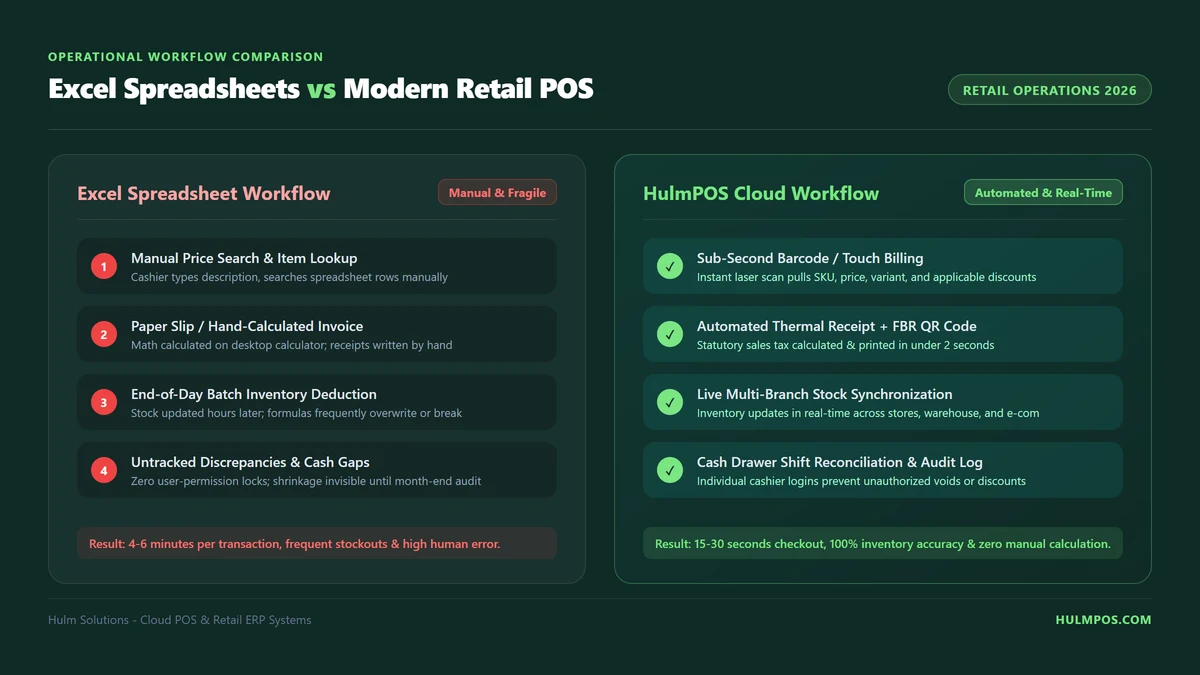
The difference becomes more noticeable when a shop handles dozens or hundreds of transactions daily.
4. Why Excel Becomes Difficult as Your Retail Business Grows
Excel can manage structured information, but retail operations involve more than storing numbers in rows and columns.
The challenge increases when multiple activities depend on the same information.
A. Every Sale Requires Additional Record-Keeping
When a product is sold, the business needs an accurate transaction record and updated inventory.
With a standalone spreadsheet, someone must enter the transaction or update the relevant data through another process.
For example:
- A shop sells 15 shirts throughout the day.
- If the employee records only the sales amount but forgets to update inventory, the spreadsheet will continue showing an incorrect stock quantity.
- The owner may believe 40 shirts are available when only 25 remain.
B. Multiple Spreadsheets Create Confusion
As businesses grow, owners often create separate files:
- Daily Sales.xlsx
- Stock Management.xlsx
- Purchase Records.xlsx
- Supplier Details.xlsx
- Monthly Profit.xlsx
- Customer Records.xlsx
Now the same information may need to be entered in multiple places.
A purchase recorded in one file might not be reflected in another. An updated product price might remain unchanged in an older spreadsheet.
This creates unnecessary reconciliation work.
C. Employees Need Consistent Processes
When more than one employee handles sales, stock or purchasing, the business needs a consistent way to record activities.
A spreadsheet can support shared editing, but it does not automatically provide the complete checkout and inventory workflow of a POS.
Employees may use different formats, enter incorrect values or forget important information.
A POS system can provide a standardised process and, depending on the software, separate user accounts and access permissions.
D. Business Reporting Takes Longer
Retail owners need answers to important questions:
- How much did the shop sell today?
- Which products are selling fastest?
- What is the remaining stock?
- Which products need restocking?
- How much did the business purchase?
- What is the difference between sales and profit?
Excel can answer many of these questions if data is accurate and the required formulas or reports are maintained.
However, collecting and preparing the information can become time-consuming.
A connected POS system can make relevant transaction and inventory information easier to review.
5. 7 Signs Your Retail Shop Has Outgrown Excel
There is no fixed number of products or monthly sales that automatically means you need POS software.
The right time to upgrade depends on the complexity of your daily operations.
Here are seven practical warning signs.
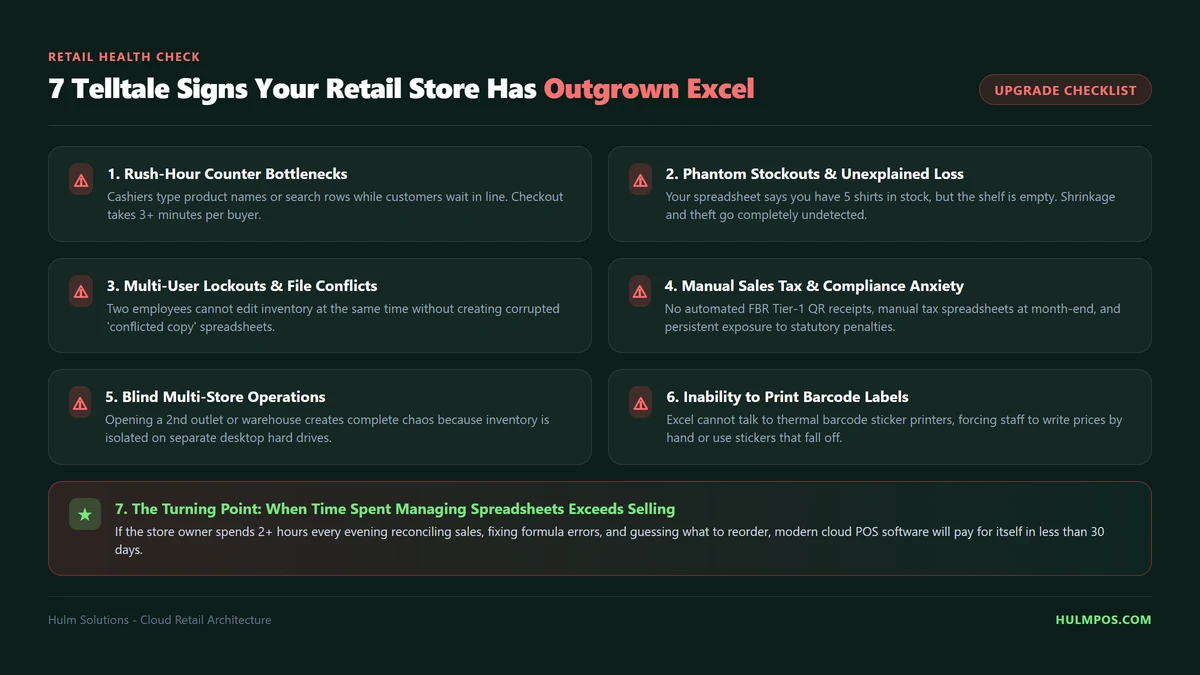
1. Your Stock Records Do Not Match Physical Inventory
This is one of the most important signs.
Your spreadsheet shows 20 products available, but when a customer asks for an item, you discover that only 12 are actually on the shelf.
Possible reasons include:
- Sales not recorded.
- Incorrect stock entries.
- Unrecorded purchases.
- Damaged or returned products.
- Manual calculation errors.
When stock discrepancies become frequent, managing inventory through manual spreadsheets becomes increasingly difficult.
A retail POS with connected inventory management can help keep stock records updated as sales and other supported stock movements are recorded.
2. You Spend Too Much Time Updating Spreadsheets
Consider how much time you spend every day:
- Entering sales.
- Updating product quantities.
- Recording purchases.
- Checking supplier records.
- Preparing daily reports.
- Correcting spreadsheet mistakes.
If employees spend more time maintaining files than serving customers, your current process may be inefficient.
The objective of upgrading is not simply to use newer technology. It is to reduce repetitive administrative work.
3. You Cannot Check Today's Sales Easily
Imagine receiving a call from a business partner asking:
“How much did our shop sell today?”
If you need to contact the cashier, request a spreadsheet and calculate the total manually, you do not have convenient access to current sales information.
A cloud-based POS can make transaction and sales information available through supported connected devices.
This is particularly useful for owners who cannot remain physically present at the shop throughout the day.
4. More Than One Employee Handles Sales
When different employees use the same spreadsheet, maintaining accurate records becomes more complicated.
You may need to know:
- Who processed a transaction?
- Which employee handled a particular sale?
- What amount was received?
- Which transactions were recorded?
- Who is responsible for opening and closing cash?
Look for POS software that supports separate user accounts, appropriate permissions and transaction records.
5. You Frequently Run Out of Fast-Selling Products
If you discover that popular products are out of stock only when customers ask for them, your inventory process may not provide enough visibility.
For example, a grocery shop may sell its most popular cooking oil every day.
Without a reliable stock record, the owner might not notice that the remaining quantity is low until the product is unavailable.
A POS system with low-stock alerts and inventory visibility can help identify products that need attention.
6. Managing Multiple Branches Has Become Difficult
A separate Excel file for each branch can make centralised management complicated.
The owner may need to collect reports from different employees, combine inventory information and compare sales manually.
A suitable multi-branch POS can provide centralised visibility into branch operations, subject to the software's supported capabilities.
7. You Cannot Understand Business Performance Quickly
Knowing how much money entered the cash drawer does not tell you how profitable your business is.
You also need to understand:
- Product purchase costs.
- Selling prices.
- Inventory value.
- Operating expenses.
- Discounts and returns.
- Other relevant business costs.
If you cannot prepare reliable business reports without spending hours combining spreadsheets, it may be time to move to a more connected management system.
Retail Shop Upgrade Readiness Checklist
Use this checklist to evaluate your current situation.
| Warning sign | Your answer |
|---|---|
| Stock frequently differs from spreadsheet records | Yes / No |
| Sales are entered manually after checkout | Yes / No |
| You maintain multiple spreadsheets | Yes / No |
| Employees struggle to maintain consistent records | Yes / No |
| You cannot easily check daily sales | Yes / No |
| You regularly discover stock shortages too late | Yes / No |
| You struggle to compare branch performance | Yes / No |
If several answers are yes, evaluate whether a retail POS system can solve these operational problems.
There is no universal score or product-count threshold. Your actual workflow matters more than an arbitrary number.
6. When Is Excel Still Enough for a Retail Business?
Not every small shop needs to purchase POS software immediately.
Excel may remain a practical option when:
- You operate a single small shop.
- Only one person handles most transactions.
- Your product catalogue is limited.
- You have relatively few daily transactions.
- You can maintain accurate stock records.
- You do not need connected checkout and inventory workflows.
- Your reporting requirements are simple.
For example, a small home-based business selling 15 different products may be perfectly comfortable maintaining a spreadsheet.
However, a growing supermarket with multiple cashiers and hundreds of products has different operational requirements.
A Simple Decision Guide
| Your business situation | Recommended approach |
|---|---|
| Small product catalogue, one person | Excel may be enough |
| Occasional sales and simple records | Excel may be enough |
| Frequent billing transactions | Consider POS software |
| Multiple employees handling sales | POS is worth evaluating |
| Regular inventory mismatches | Consider upgrading |
| Barcode-based checkout required | POS is generally more suitable |
| Multiple branches | Evaluate multi-branch POS |
| Connected billing, stock and reporting needed | POS is generally more suitable |
Remember: You do not need to abandon Excel completely when adopting POS software.
You can continue using spreadsheets for additional analysis, budgeting and customised reports by exporting data from systems that support it.
The better approach is to use each tool for what it does best.
7. How POS Software Improves Daily Retail Operations
A POS system can replace disconnected manual processes with a more organised workflow.
Here are some important improvements to evaluate when choosing software.
Faster Billing and Checkout
A dedicated POS checkout screen allows employees to search for products, scan barcodes, add quantities and generate invoices.
Instead of calculating every transaction manually, the software handles the supported billing calculations.
For a busy shop, a consistent checkout process can help employees serve customers more efficiently.
Inventory Updates Connected to Sales
A POS system can connect product sales with inventory records.
For example:
- A shop has 50 units of a product.
- A customer purchases 3 units.
- After the transaction is recorded, the available quantity becomes 47.
This reduces the need to manually update stock after every sale, although other stock movements still need to be recorded correctly.
Better Product and Category Management
A retail POS provides a structured product catalogue.
A clothing shop might organise products into:
- Men's Clothing
- Women's Clothing
- Jeans
- Shirts
- Trousers
- Accessories
- Footwear
Products can be searched and managed through the software instead of relying on manually maintained lists.
Searchable Sales History
Instead of searching through multiple files, a POS can provide transaction records that help owners review previous sales.
Depending on the software, these records may include:
- Order IDs.
- Transaction dates.
- Payment methods.
- Customer information.
- Transaction amounts.
- Receipt details.
- Returns and related records.
Purchase and Supplier Management
Retailers need to manage stock coming into the business as well as products going out.
Suitable POS software can provide purchase and vendor management workflows to organise supplier records and purchase transactions.
Business Reporting
A POS can turn recorded transactions into useful reports.
Depending on the available modules, retailers may review:
- Daily sales.
- Sales history.
- Product performance.
- Inventory quantities.
- Inventory valuation.
- Purchase information.
- Branch performance.
Profit calculations should always be checked against the actual costs and expenses included in the report.
8. Excel to POS Software: How to Upgrade Without Losing Your Data
One of the biggest concerns retail owners have when switching from Excel to POS software is losing their existing business records.
The good news is that you do not necessarily need to enter every product manually.
If your selected POS supports spreadsheet imports, you can prepare your existing product information and transfer compatible records into the new system.
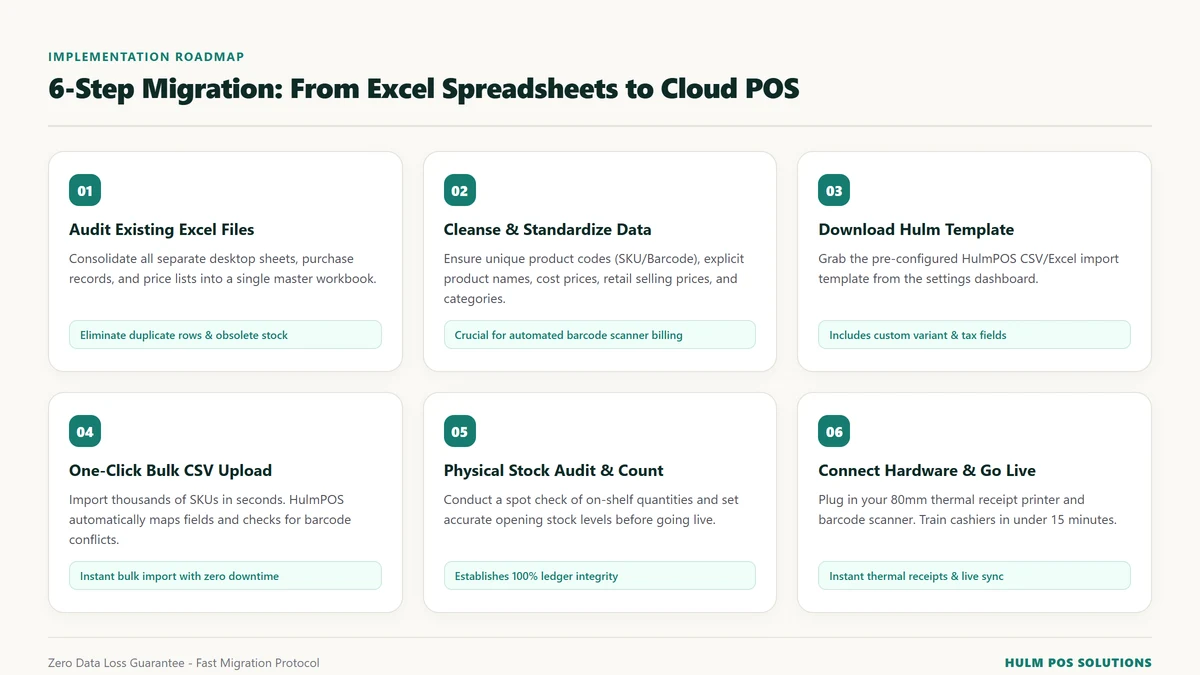
Here is a practical migration process.
Step 1: Review Your Existing Excel Files
Start by collecting your current business spreadsheets.
For example:
- Product inventory.
- Product categories.
- Selling prices.
- Purchase costs.
- Barcodes.
- Customer information.
- Supplier records.
Identify duplicate products, outdated information and missing values before migration.
Step 2: Clean Your Product Data
Your spreadsheet should contain consistent information.
A basic product sheet might look like this:
| Product Name | SKU | Barcode | Category | Cost | Selling Price | Quantity |
|---|---|---|---|---|---|---|
| Men's Jeans | JNS001 | 100001 | Clothing | 1,500 | 2,500 | 40 |
| Casual Shirt | SHT001 | 100002 | Clothing | 1,000 | 1,800 | 30 |
| Leather Belt | BLT001 | 100003 | Accessories | 400 | 700 | 25 |
Check the following:
- Product names are consistent.
- SKUs are unique where required.
- Barcodes are correctly recorded.
- Categories are organised.
- Selling prices are accurate.
- Opening quantities match your physical stock.
- Duplicate entries are removed.
Step 3: Choose POS Software That Supports Data Import
Before selecting a POS provider, ask whether it supports bulk product imports.
Check whether you can import:
- Products.
- Categories.
- Customer records.
- Barcodes.
- Other supported product information.
Also ask about historical sales, purchase records and supplier migration separately. Do not assume every type of historical data can be imported through the same process.
Step 4: Import Your Data Into the POS
Use the software's supported import template.
Map your spreadsheet columns to the corresponding POS fields, upload the file and review any validation errors.
Correct missing or incorrectly formatted values before completing the import.
Step 5: Verify Inventory and Start Billing
Before using the system for live transactions:
- Compare imported products against your spreadsheet.
- Check product prices and barcodes.
- Verify opening stock quantities.
- Test a few sample transactions.
- Check that sales update the correct inventory records.
- Train employees on the checkout process.
Once the information is verified, you can begin using the POS for daily operations.
How HulmPOS Makes Retail Data Migration Easier
HulmPOS provides product and inventory data import and export functionality.
Its supported workflows include:
- Importing and exporting products.
- Importing and exporting categories.
- Importing and exporting customers.
- Downloading data templates.
- Uploading files.
- Validating file formats before import.
This helps businesses move supported records from existing spreadsheets into a more organised retail management system.
You can explore HulmPOS features here: Explore HulmPOS Features
9. How Much Does Retail POS Software Cost in Pakistan?
Many Pakistani retailers continue using Excel because they want to avoid additional software expenses.
However, the cost of managing a shop is not limited to the subscription price of a tool.
Consider the time spent maintaining records, correcting stock errors, preparing reports and manually reconciling transactions.
A better comparison includes the overall cost of your current process.
Calculate the Hidden Cost of Excel
Use this simple formula:
For example, if your employee spends 30 hours every month updating sales and inventory records, calculate how much that time costs your business.
You can then compare this amount with the subscription cost of suitable POS software.
This is an illustrative calculation, not a guaranteed saving from switching.
HulmPOS Pricing for Pakistani Retailers
HulmPOS offers different subscription plans depending on business size and operational requirements.
| Plan | Monthly Price | Users | Branches |
|---|---|---|---|
| Starter | PKR 2,500 | 1 | 1 |
| Growth | PKR 5,500 | 5 | 2 |
| Business | PKR 11,000 | 10 | 5 |
| Enterprise | Custom | Tailored | Tailored |
Starter Plan – PKR 2,500/month
Suitable for smaller shops that need POS billing, cash management, basic inventory, customer records and sales reports.
Growth Plan – PKR 5,500/month
Designed for growing businesses that need additional users, branches, customer CRM, loyalty, vendor management, purchase management, order management and advanced reporting.
Business Plan – PKR 11,000/month
For established operations requiring additional users and branches, accounting dashboards, automation workflows and API integrations.
HulmPOS also provides a 14-day free trial without requiring a credit card at signup.
Check the latest plan inclusions and terms:
10. Excel vs POS Software: Which Is Right for Your Shop?
The right choice depends on your business requirements.
Here is how different retail businesses can approach the decision.
Grocery and Kiryana Stores
Grocery stores manage frequently sold products, multiple categories and regular supplier purchases.
If you are manually updating stock after every sale, a POS with barcode billing and connected inventory can simplify daily operations.
Explore: HulmPOS for Retail Stores
Clothing and Boutique Stores
Clothing shops often manage multiple product categories, styles, sizes and seasonal collections.
A POS can help organise product records, billing, inventory and sales history.
Explore: HulmPOS for Clothing Stores
Electronics Stores
Electronics retailers may handle products with different models, specifications, accessories and purchase costs.
They should evaluate product catalogues, barcode billing, inventory history and any required serial-number or warranty workflows.
Explore: HulmPOS for Electric Stores
Supermarkets and Multi-Branch Retailers
Supermarkets generally need structured checkout, product management, stock monitoring and reporting.
Businesses with multiple branches should evaluate centralised inventory and branch-level reporting.
A suitable multi-branch POS can reduce dependence on separate spreadsheets and manually collected reports.
11. Frequently Asked Questions
Ans. Yes. Excel can work well for a small retail shop with limited products, low transaction volumes and simple record-keeping requirements. However, as inventory, employees and daily transactions increase, a dedicated POS system may become more practical.
Ans. Excel is a spreadsheet application designed for storing, calculating and analysing information. POS software is designed to process retail transactions and connect sales with inventory, customers and business records. A POS can automate parts of the retail workflow that would otherwise require manual spreadsheet updates.
Ans. Consider switching when stock records regularly become inaccurate, employees handle multiple transactions, billing takes too long, sales reporting is difficult or you need connected inventory and multi-branch management.
Ans. Yes. Excel can track product names, quantities, prices and stock calculations using formulas. However, a standalone spreadsheet does not automatically know when a sale happens. Someone must update it or connect it to another system.
Ans. Yes, if the POS provider supports compatible spreadsheet imports. You can generally prepare product data, clean duplicate entries, map spreadsheet columns and import supported records using the provider's template. Always verify stock quantities after importing.
Ans. Pricing depends on the provider, features, users and branches. HulmPOS offers a Starter plan beginning at PKR 2,500 per month and a 14-day free trial. Retailers should compare the complete cost against their operational requirements.
Ans. Yes. Excel remains useful for additional analysis, custom calculations, budgeting and reports. Many POS platforms provide data export functionality, allowing businesses to use both tools for different purposes.
Ans. Many POS systems connect sales with inventory. When a transaction is completed, the sold product quantities can be updated automatically. However, opening stock, purchases, returns and other stock movements must also be recorded correctly.
Ans. A cloud-based POS can be more suitable when multiple branches need shared business information, centralised reporting and connected inventory management. Separate spreadsheets can still be used, but maintaining consistent records across locations may require additional manual work.
Ans. HulmPOS provides data import and export functionality for supported products, categories and customer records. It also provides templates and file validation to help prepare compatible data for importing.
Ans. Requirements depend on the business's taxpayer status, category and applicable FBR regulations. Not every retailer has identical obligations. Check the relevant requirements with FBR or a qualified tax professional before choosing your compliance setup.
12. Final Verdict: When Should You Upgrade from Excel to POS Software?
Excel is a useful tool for starting and managing simple business records. It offers flexibility, calculations and data analysis without requiring a dedicated retail management platform.
But when your shop grows, the work involved in maintaining separate spreadsheets can become increasingly complicated.
If you are regularly correcting stock quantities, manually recording sales, maintaining multiple files, preparing reports and collecting information from employees, it may be time to evaluate a retail POS system.
The objective is not to stop using Excel altogether. It is to stop depending on manual spreadsheets for everyday operations that could be handled through a connected billing and inventory system.
HulmPOS helps Pakistani retailers bring billing, product management, inventory, sales history and business reporting together in one cloud-based platform.
Instead of spending hours maintaining disconnected records, you can give your business a more organised way to manage daily operations.
Start with a 14-day free trial and see whether HulmPOS fits your shop.
Ready to move beyond Excel?
- Website: POS | Best POS Software | Point of Sale Systems in Pakistan
- Start free trial: Create Your Hulm Solutions Workspace | Get Started Today
- Pricing: Hulm POS Software Price in Pakistan | Hulm Solutions
- WhatsApp: +92 339 111 9259
- Email: info@hulmsolutions.com
About the Author
Hulm Editorial Team
The Hulm Editorial Team publishes educational resources about POS software, retail management, inventory management, billing systems and business technology. Our goal is to help Pakistani retailers understand modern business tools and make informed decisions about managing their operations.
Last Updated: November 2026References and Further Reading
- Microsoft – Using Access or Excel to Manage Your Data
- Microsoft – Excel Specifications and Limits
- HulmPOS – Retail POS Features
- HulmPOS – Pricing
- HulmPOS – Retail POS Implementation Case Study: The Laptop Store
Upgrade Your Business with Hulm POS
Designed for speed, simplicity, and multi-location scalability. Start ringing up sales in minutes.
Start Your Free Trial
 WhatsApp