
Your Staff Sell Products but Forget to Update Stock. How Do You Stop Inventory Confusion?
Table of Contents
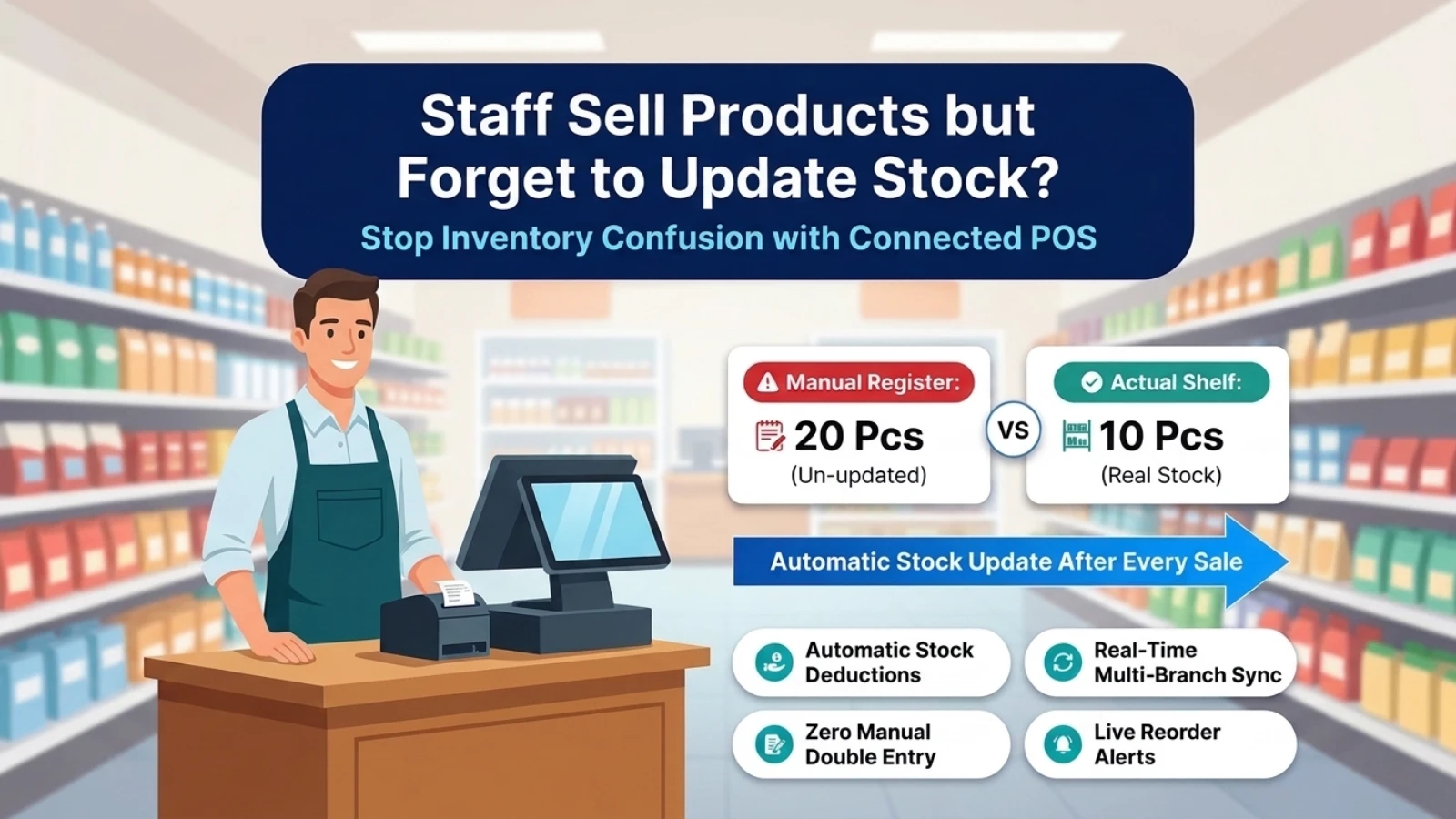
You had 20 pieces of a product in stock this morning.
Your staff sold 10 throughout the day.
But nobody updated the stock register.
At closing time, your inventory record still shows 20 pieces.
Your system says you have 20. Your shelf has only 10.
Now imagine this happening with 50, 100, or 500 products every single week.
You might order products you already have in stock, promise customers items that are already sold out, or completely lose track of what is actually selling. When store owners ask how to track shop inventory effectively, the answer is never “tell staff to write faster.” If your business wants to prevent inventory mistakes, you need a workflow that updates automatically as sales happen.
The problem isn't necessarily your staff. It is a stock-management process that relies on human memory to update registers manually after every single sale.
The solution? Connect your checkout billing directly with your inventory records through dedicated POS software for inventory management. Using cloud-based retail inventory tracking software like HulmPOS, staff record sales at the counter, and recorded quantities trigger automatic stock updates after sales in real time.
Quick Answer: How Do You Stop Staff From Forgetting Stock Updates?
To stop inventory confusion permanently, implement a connected POS workflow following these core principles:
- Eliminate separate stock entries: Never ask employees to record a sale on a counter register and then open an Excel sheet to update stock.
- Use barcode scanning at checkout: Scanning the barcode records the sale, issues the customer receipt, and subtracts the exact quantity from stock simultaneously.
- Enable automatic stock updates after sales: Ensure your inventory management software for retail stores deducts quantities instantly when checkout completes.
- Record supplier inward shipments digitally: Log incoming stock immediately using purchase invoices rather than keeping paper slips in a drawer.
- Handle returns and damages within the POS: Create standard digital workflows for returned items, exchanges, and expired goods.
- Perform regular cycle audits: Count 10 to 20 fast-moving products weekly to catch unrecorded shrinkage before month-end.
1. The Daily Dilemma: One Sale, Two Different Stock Numbers
Consider a typical clothing store selling denim jeans in Lahore or Karachi:
| Activity | Quantity |
|---|---|
| Opening stock (Morning) | 20 Pcs |
| Products sold during the day | 10 Pcs |
| Actual physical remaining stock on shelf | 10 Pcs |
| Manually recorded stock in register / spreadsheet | 20 Pcs (Unupdated!) |
Your employee completed the transactions, collected payment from the customers, and handed over the shopping bags. But because they had to serve the next customer in line, they never opened the stock register notebook or Excel workbook.
Now, the business owner sees incorrect inventory information. This creates three critical business failures:
Wrong Purchasing Decisions
You might place an unnecessary reorder for items you already have, or delay ordering fast-selling stock because your record falsely claims you still have 20 units.
Embarrassing Missed Sales
A phone or online customer asks if a product is available. Staff check the register, confirm it is in stock, but discover an empty shelf when attempting to fulfill the order.
Unreliable Financial Reports
Your reported inventory asset value is completely distorted. You cannot confidently file tax declarations, evaluate profitability, or plan supplier payments.
The more products and SKU variations your store carries, the harder manual stock updates become.
2. Why Does Inventory Confusion Happen in Retail Shops?
Retail environments are fast, noisy, and customer-driven. Inventory confusion rarely happens because staff are careless; it happens because manual disconnected systems create five natural friction points:
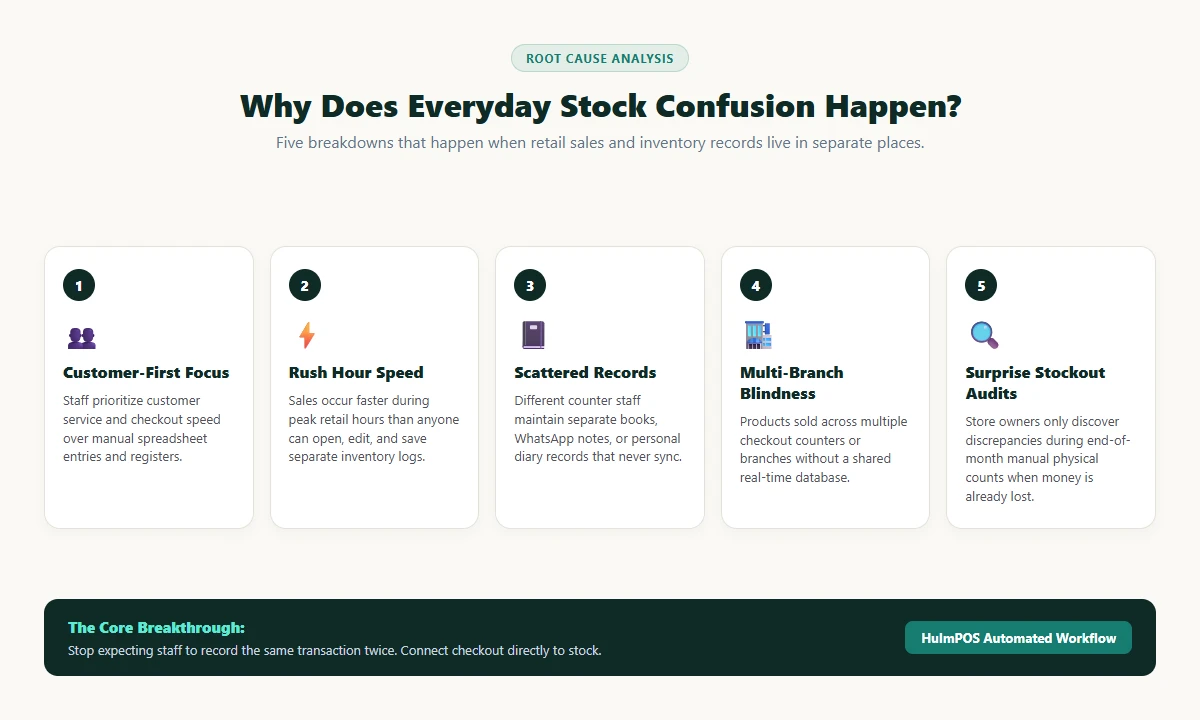
Staff focus on serving customers, not updating spreadsheets
When five customers are waiting at the counter, a cashier cannot pause to open an Excel file, locate row 342, and decrement the quantity.
Sales happen faster than manual stock entries
During weekend rushes, festival seasons, or promotional sales, hundreds of items cross the counter in minutes. Manual logs lag behind by hours or days.
Different employees maintain different records
The morning shift writes sales in a counter notebook. The evening cashier saves records on their personal phone. The store manager maintains a master Excel sheet that is always out of date.
Products are sold through multiple counters or branches
If you operate two billing counters in one shop, or multiple shops across the city, separate registers cannot communicate. Counter 1 sells an item while Counter 2 still believes it is in stock.
Owners discover stock differences only when they physically count products
By the time a store owner conducts a quarterly or annual physical inventory audit, weeks of unaccounted shrinkage, untracked sales, and missed replenishment opportunities have already eroded net profit.
The biggest mistake is keeping sales records and stock records separate. If your business records a sale in one place and inventory in another, someone has to remember to update both. That creates double work and infinite opportunities for human error.
3. How POS Software Solves the Disconnected Stock Problem
A modern POS inventory management system connects product sales directly with stock deduction at the database level.
Instead of asking staff to remember to update a separate spreadsheet after every sale, the business records the transaction through the POS checkout process. The software automatically handles the math behind the scenes.
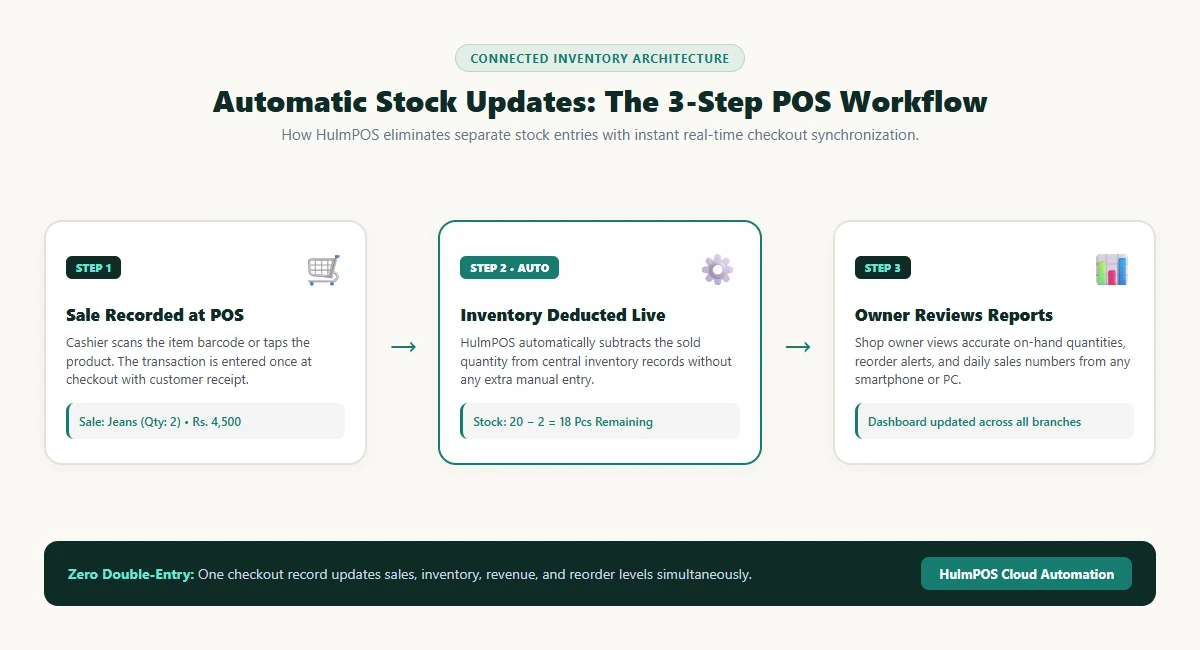
The Basic 5-Step Connected POS Workflow:
- Add products and opening quantities: Upload your product catalogue with starting shelf counts into HulmPOS.
- Staff select products when making a sale: Cashiers scan the barcode or tap the product on a touchscreen terminal or phone.
- The sale is recorded in the POS: The customer receipt is printed or sent electronically, and payment is registered.
- Inventory quantities are updated immediately: The system subtracts the sold quantity from central inventory in real time.
- The owner reviews available stock information: Monitor live balances, low-stock warnings, and reorder alerts anytime from your phone or laptop.
Stock records stay useful only when staff record sales, returns, purchases, transfers, and damaged goods correctly. A POS system cannot account for products that leave the store without being rung up. Establishing cashier accountability and shift closing procedures — such as our Start Day and End Day cash drawer SOP — ensures data integrity remains 100%.
4. Manual Stock Register vs. POS Inventory Management
How does a manual paper register compare with an integrated cloud-based POS system for retail shops? Here is a direct side-by-side comparison:
| Feature & Workflow | Manual Stock Register / Excel | POS-Based Stock Management (HulmPOS) |
|---|---|---|
| Stock updates timing | Staff must remember to update stock in a separate book or sheet after sales. | Stock is automatically updated the second a sale is recorded during checkout. |
| Employee forgetfulness risk | High risk during peak hours. Entries are skipped, delayed, or lost entirely. | Zero risk. The checkout process cannot complete without deducting items. |
| Record centralization | Owner must manually cross-examine paper receipts, cash notes, and notebooks. | Sales, products, stock, and revenues are consolidated in one cloud dashboard. |
| Calculation speed & accuracy | Manual math takes hours and frequently contains addition or typing errors. | System calculates live stock quantities, valuation, and cost of goods sold instantly. |
| Multi-branch stock visibility | Nearly impossible. Requires endless WhatsApp messages and phone calls to check stock. | Centralized network view. Check stock across Branch A, B, and C in one click. |
| Low stock reorder alerts | Discovered only when shelves are physically empty and customers walk away empty-handed. | Automated reorder notifications trigger when items drop below minimum thresholds. |
5. How HulmPOS Connects Sales with Inventory After Every Checkout
HulmPOS is the premier stock management software in Pakistan built for retail businesses, supermarkets, grocery stores, pharmacies, apparel brands, and wholesale outlets. It brings sales, product catalogues, real-time inventory movements, customer records, and multi-location management into one cohesive system.
Here is how HulmPOS permanently eliminates everyday stock confusion:
1. Connect Product Sales Directly with Inventory
When your counter staff ring up a customer through the HulmPOS checkout terminal, the system automatically decrements the exact quantity from your inventory database. There is no separate spreadsheet, no secondary book, and no need for staff to remember anything later.
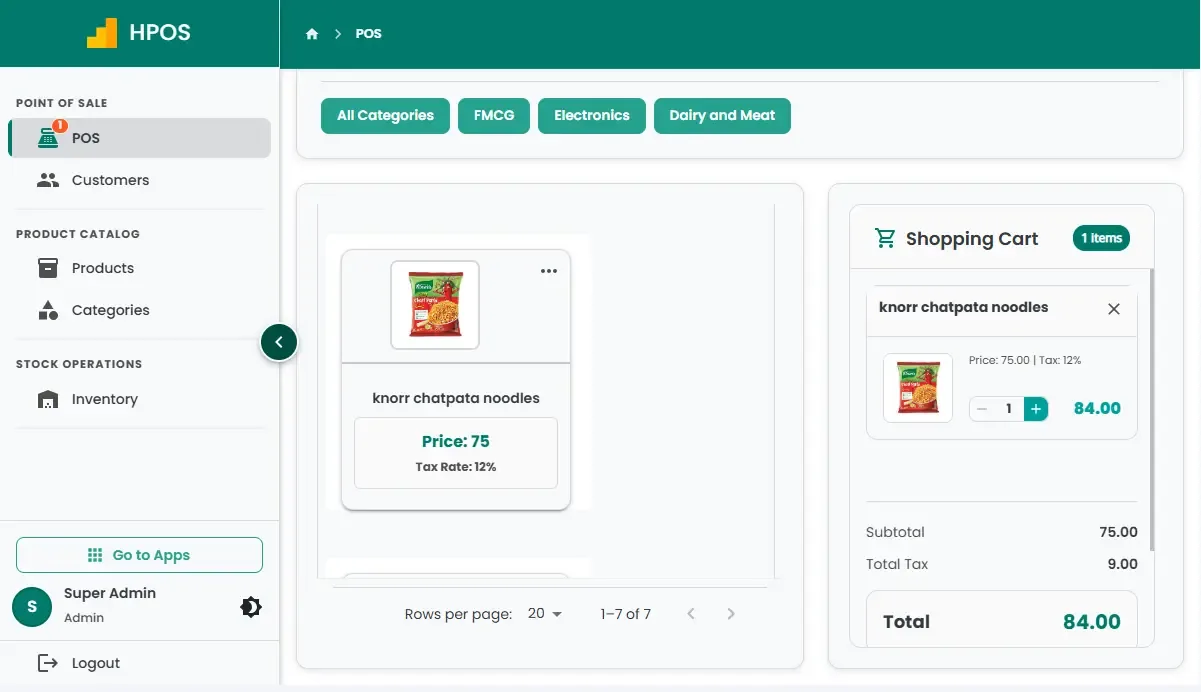
2. Manage All Your Products and Variations in One Place
Manage your complete product catalogue, pricing, and stock levels through one clean screen. For example, a clothing boutique or retail apparel store can easily organize:
- Men's Jeans (Skinny, Slim, Regular)
- Women's Jeans and Trousers
- Formal Shirts & Casual T-Shirts
- Children's Wear & Seasonal Collections
- Product sizes (S, M, L, XL, XXL) and color variations
This structured taxonomy ensures you never wonder whether a specific size 32 waist is in stock or sold out.
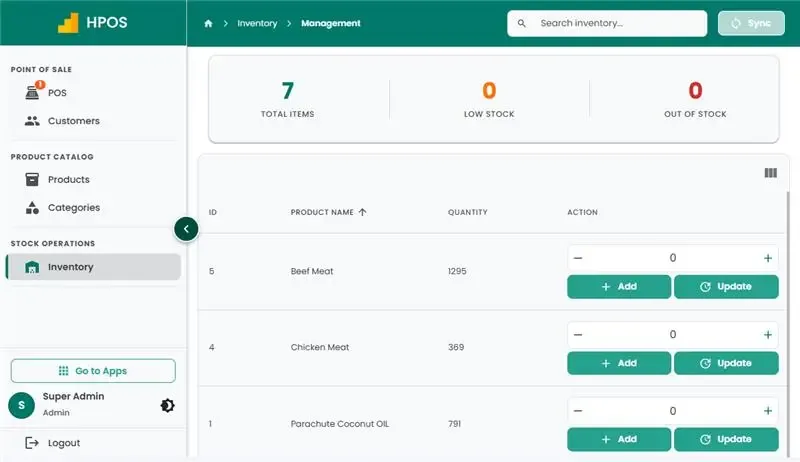
3. Keep Sales and Stock Information Connected
When transactions flow through a connected system, your business maintains a single source of truth. You can view daily gross sales, compare them with your cash, card, and bank transfer payment breakdown, and review your exact remaining stock on hand without manual calculation.
4. Manage Stock in Multiple Branches from One Centralized Dashboard
Operating more than one shop makes manual inventory management exponentially harder. If a customer in your Gulberg, Lahore branch wants a shirt size that is sold out, staff can instantly check stock at your DHA branch and initiate an official stock transfer note. HulmPOS empowers retail owners to manage stock in multiple branches effortlessly with live cross-location counts.
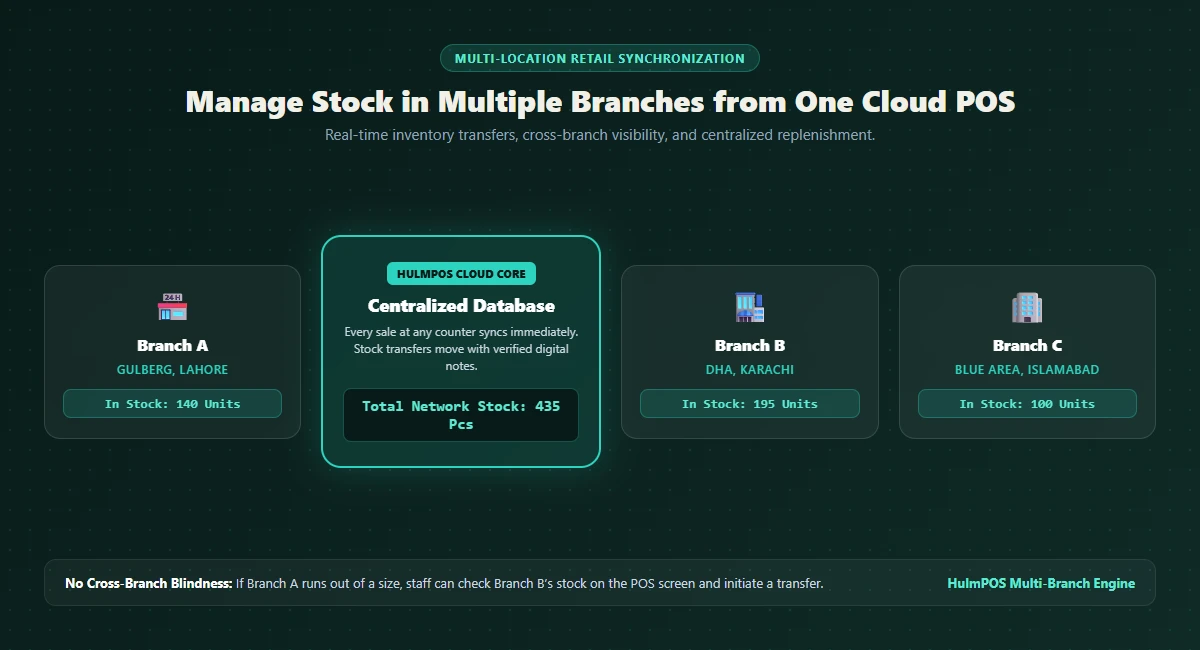
Learn more in our guide on how to manage multiple retail branches without separate spreadsheets.
6. A Real-World Calculation: The 100 − 35 + 20 Inventory Formula
Let us see the power of sales-connected stock tracking in action with a concrete retail day example:
- Your shop starts the morning with 100 products on hand.
- Throughout the day, staff sell 35 products to walk-in customers.
- In the afternoon, another 20 products arrive from a distributor.
If employees forget to record the 35 sales or forget to enter the 20 incoming products into an Excel file, your manual register may show 100, 65, or 120 pieces. When you look at the shelf, you have 85.
A sales-connected inventory system records every movement as it happens:
- Each customer sale deducts stock automatically at the moment of payment.
- The supplier shipment is entered through a digital Goods Received Note (GRN) or purchase order in 30 seconds.
- At 9:00 PM closing, the owner checks the HulmPOS dashboard and sees 85 products.
7. Stop Managing Your Retail Store with Disconnected Records
If your staff are recording sales in one place, inventory in another, customer udhaar khata in a pocket diary, and supplier purchases on scattered paper receipts, your business is carrying unnecessary friction.
HulmPOS brings your critical daily retail operations together into one cloud platform:
Organize sizes, colors, categories, and custom barcode labels.
Fast touchscreen billing, barcode scanning, and receipt printing.
Automatic stock deduction, low stock alerts, and reorder levels.
Record vendor bills, inward stock, and track supplier payables.
Monitor top-selling products, daily profits, and cashier shifts.
Connect all branches to one central cloud database seamlessly.
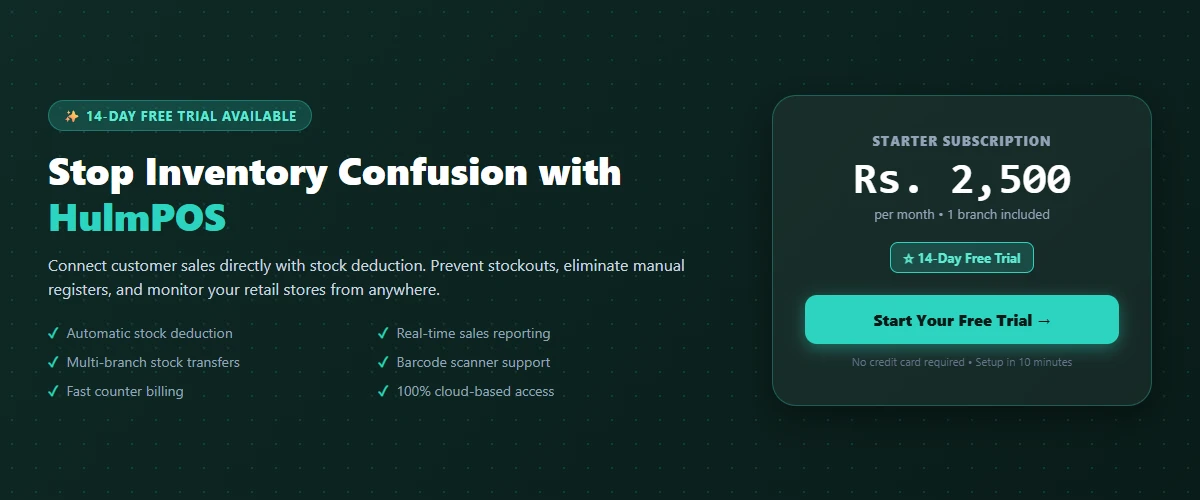
Try HulmPOS for Your Retail Business
Subscription starts at just Rs. 2,500 per month. No expensive hardware lock-ins. Works on your existing laptops, tablets, or phones.
8. Frequently Asked Questions (FAQ)
How do I stop employees from forgetting to update stock?
Use a POS software for inventory management that automatically connects recorded sales with inventory quantities. Train staff to scan or select every item on the POS during checkout, and establish standard operating procedures for recording inward shipments, returns, and write-offs.
Does POS software automatically update inventory after a sale?
Yes. When a sale is completed through HulmPOS, the inventory quantities of the sold products are automatically subtracted from your stock database in real time. You do not need to make secondary spreadsheet entries.
Can I manage stock and sales in one POS system?
Yes. An integrated POS system brings product catalogue management, sales billing, real-time stock balances, and business reporting into one software, eliminating disconnected manual records.
Why does my physical stock not match my inventory report?
Common reasons include unrecorded sales at the counter, supplier deliveries received without entering purchase invoices, customer returns placed back on shelves without a POS return, unrecorded damage/breakage, and shrinkage (theft). Routine physical counts help identify and resolve these variances early.
Is POS inventory software useful for small shops?
Yes. Small retail shops benefit significantly from organized product catalogues, automated stock deduction, and clear sales visibility. HulmPOS starts at Rs. 2,500/month, making modern cloud automation affordable for independent retailers in Pakistan.
Can I manage inventory for multiple branches?
Yes. Multi-branch cloud POS systems like HulmPOS let you monitor stock levels across multiple locations, manage inter-branch stock transfers, and synchronize product catalogues from a single administrative portal.
How much does HulmPOS cost?
HulmPOS offers a transparent subscription starting at Rs. 2,500 per month for the Starter plan (1 branch, 1 user, billing, inventory, and reporting). A 14-day free trial is available with no credit card required.
Final Takeaway: Connect Checkout to Stock Once and for All
Your employees should never have to remember to update a separate stock register or spreadsheet every time they complete a customer transaction.
Record the sale once. Keep your sales and inventory records connected. Review your stock regularly.
If inventory confusion, ghost stock, or manual counting errors are holding your business back, move from disconnected manual registers to a modern cloud POS system today.
Ready to stop inventory mistakes in your store?
Try HulmPOS for Rs. 2,500/month. Start your 14-day free trial today.
Upgrade Your Business with Hulm POS
Designed for speed, simplicity, and multi-location scalability. Start ringing up sales in minutes.
Start Your Free Trial
 WhatsApp